Importer Options
Image Extraction
When importing glTF or glb files, you can choose where extracted texture maps are saved by using the Use Relative Path option.
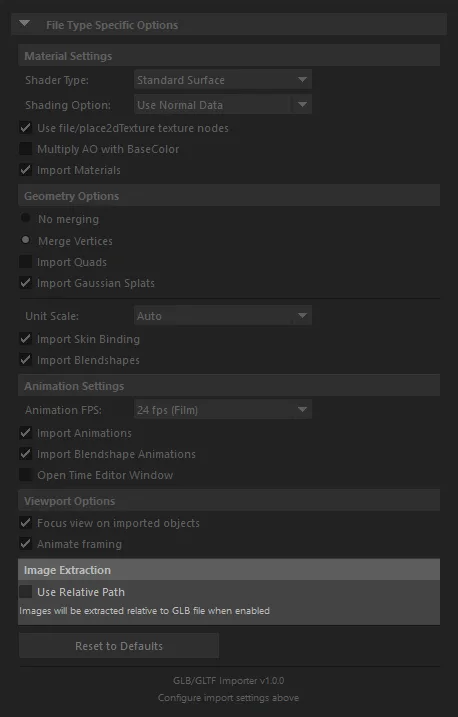
Texture Map Save Locations
Use Relative Path Unchecked (Default)
When the "Use Relative Path" checkbox is unchecked, images will be saved in the default Maya sourceimages directory or project directory:
C:\Users\<User name>\Documents\maya\projects\default\
                                                └── sourceimages/
                                                    └── gltf_textures/          <- extracted texture maps
                                                        ├── baseColor.png
                                                        ├── normal.png
                                                        └── ...
Use Relative Path Checked
When the "Use Relative Path" checkbox is checked, texture maps will be saved relative to the location of the imported GLB/glTF file:
path/to/your/asset/
                ├── asset.glb                   <- imported file
                └── gltf_textures/              <- extracted next to the asset
                    ├── baseColor.png
                    └── ...
Image Format Handling
WebP Textures (EXT_texture_webp)
Some glTF/GLB files store textures in WebP format using the EXT_texture_webp extension. Because Maya's built-in file texture node does not support WebP natively, the importer converts these images to PNG at import time and saves the converted .png files to the same output directory as other extracted textures. The original WebP data is not kept on disk.
The conversion is a one-time operation per file. On subsequent imports the cached PNG is reused without re-decoding.
KTX2 / BasisU Textures (KHR_texture_basisu)
KTX2 and BasisU textures are transcoded to PNG during import using the bundled pyktx runtime. See Supported Features for version compatibility details.