Sheen
glTF extension: KHR_materials_sheen
glTF properties: sheenColorFactor · sheenColorTexture · sheenRoughnessFactor · sheenRoughnessTexture
Sheen simulates the soft, retroreflective highlight characteristic of cloth and fabric surfaces. Requires KHR_materials_sheen to be enabled in the export options.
| Shader | Weight / gate attr | Color attr | Roughness attr |
|---|---|---|---|
standardSurface, aiStandardSurface |
sheen (must be > 0) |
sheenColor |
sheenRoughness |
openPBRSurface |
fuzzWeight (must be > 0) |
fuzzColor |
fuzzRoughness |
StingrayPBS |
not supported | not supported | not supported |
Sheen color and roughness share one texture image with an alpha channel:
| Channel | Data |
|---|---|
| RGB | Sheen color (sRGB) |
| A | Sheen roughness (Raw) |
Note
Sheen data is only exported when the weight attribute (sheen / fuzzWeight) is greater than 0.0.
Sheen color
Factor only
standardSurface, aiStandardSurface: Set sheen > 0 and sheenColor to the desired color.
openPBRSurface: Set fuzzWeight > 0 and fuzzColor to the desired color.
The color value exports as sheenColorFactor. In glTF, the default is black [0, 0, 0].
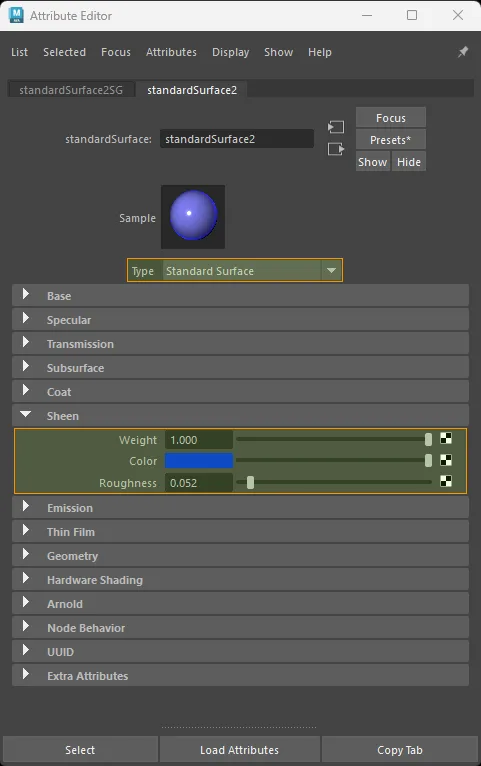
standardSurface factor-only sheen setup.
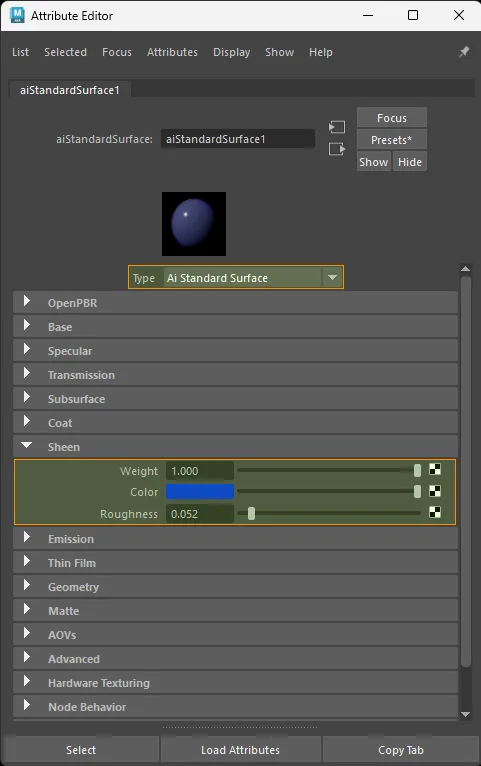
aiStandardSurface factor-only sheen setup.
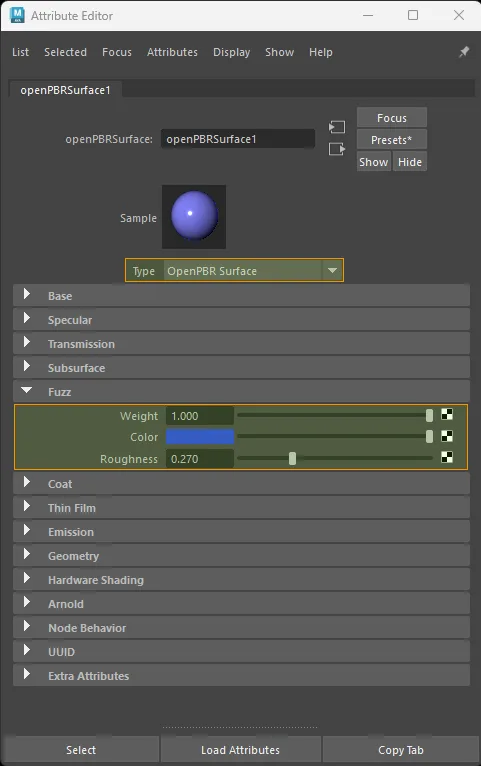
openPBRSurface factor-only sheen setup.
Texture only
Color space: sRGB
Connect the texture outColor to the color attribute:
standardSurface · aiStandardSurface:
  aiImage.outColor  ->  shader.sheenColor
  file.outColor     ->  shader.sheenColor

openPBRSurface:
  aiImage.outColor  ->  shader.fuzzColor
  file.outColor     ->  shader.fuzzColor
Exports as sheenColorTexture.
If only a sheen color texture is connected, the exporter keeps the original RGB image as sheenColorTexture. To author a color tint multiplier, route the color texture through colorComposite and set the tint color there.
Because glTF defaults sheenColorFactor to black [0, 0, 0], the exporter also writes an explicit white sheenColorFactor for texture-only sheen so the imported glTF keeps the sheen layer enabled.
Texture-only sheen color does not create sheenRoughnessTexture. Roughness is only exported when a roughness input is authored, or when the same packed RGBA image explicitly drives sheen roughness from its alpha channel.
The example below uses one packed RGBA sheen image: RGB feeds sheen color, and the same texture's alpha feeds sheen roughness.
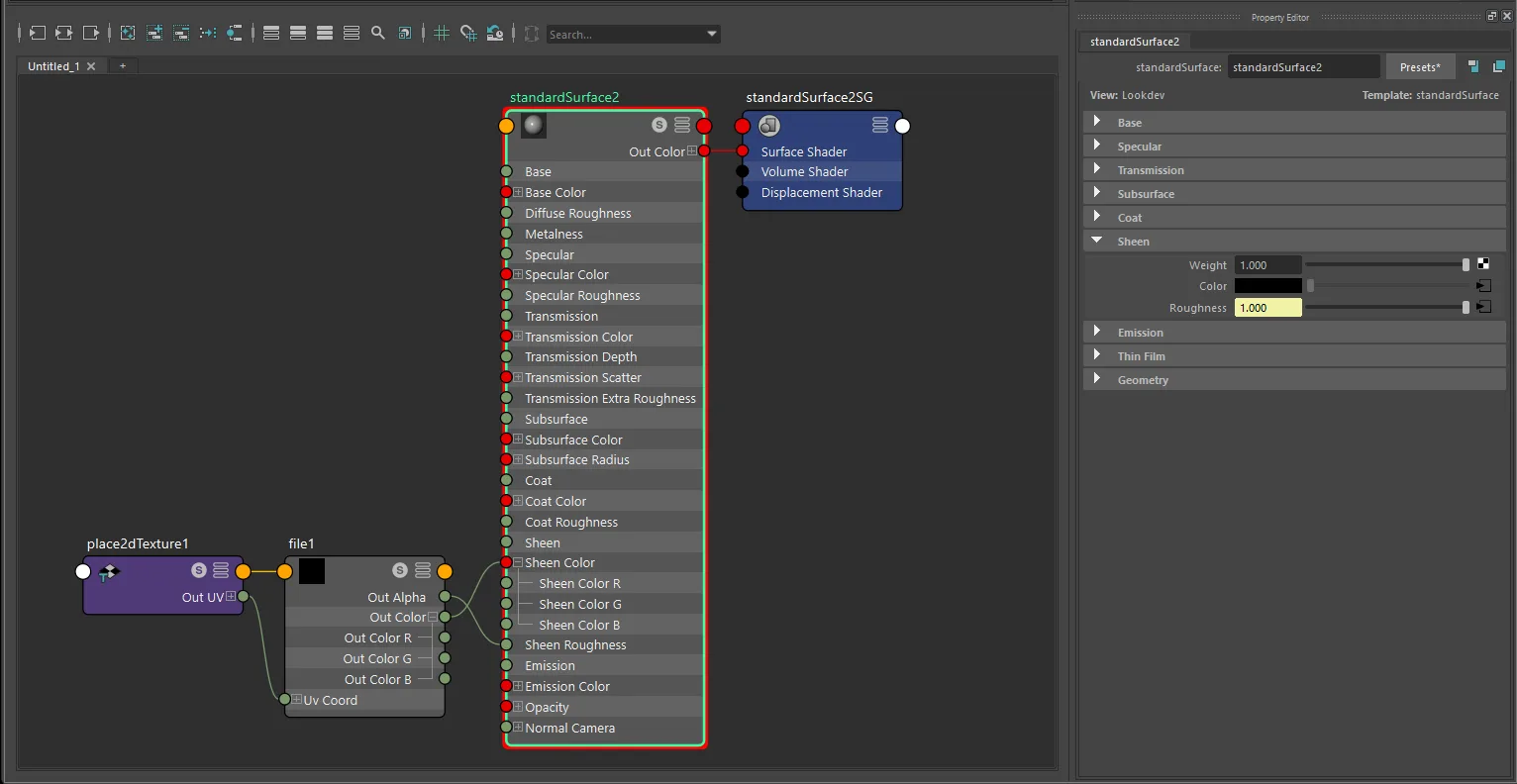
standardSurface texture-only sheen setup with file and place2dTexture.
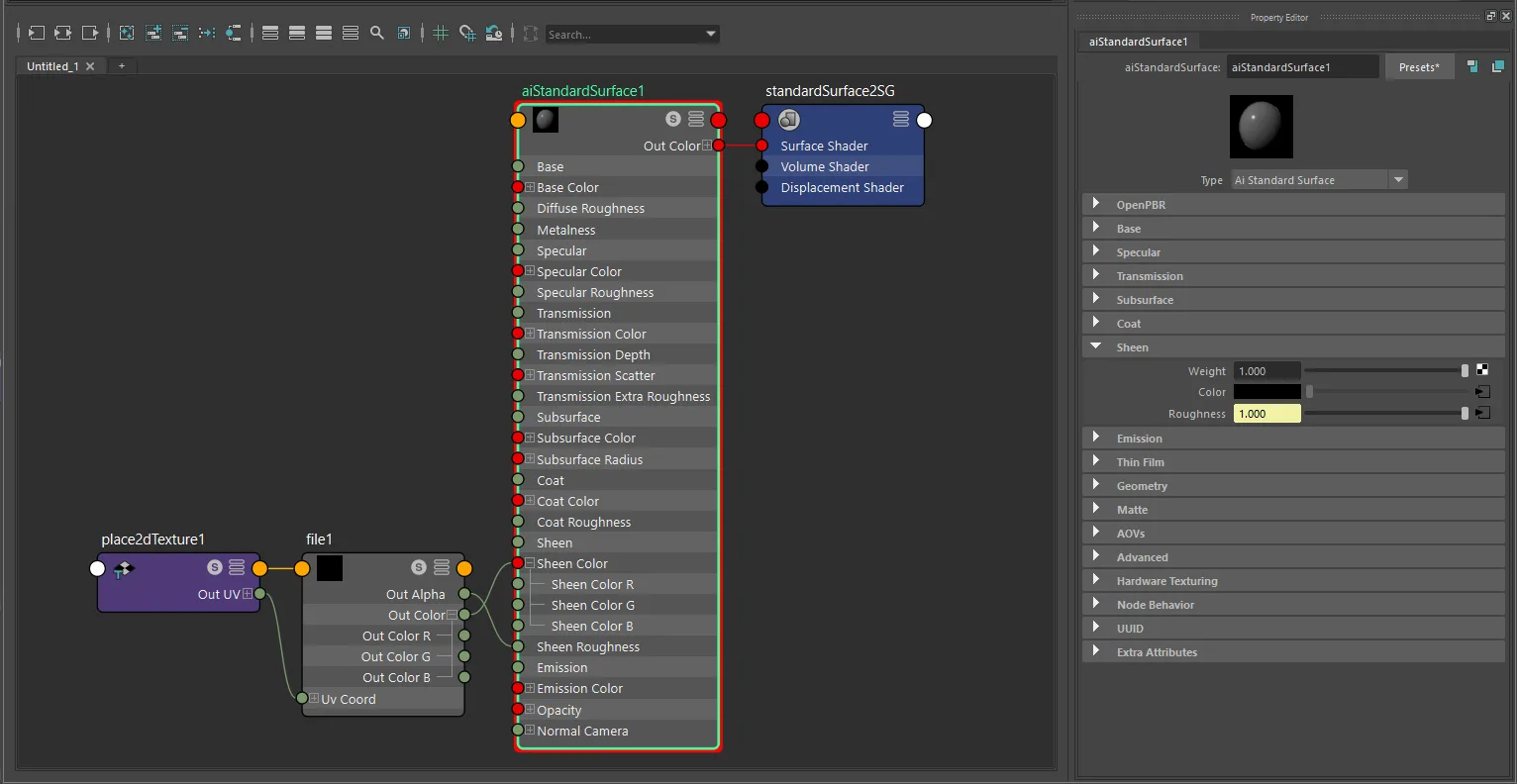
aiStandardSurface texture-only sheen setup with file and place2dTexture.
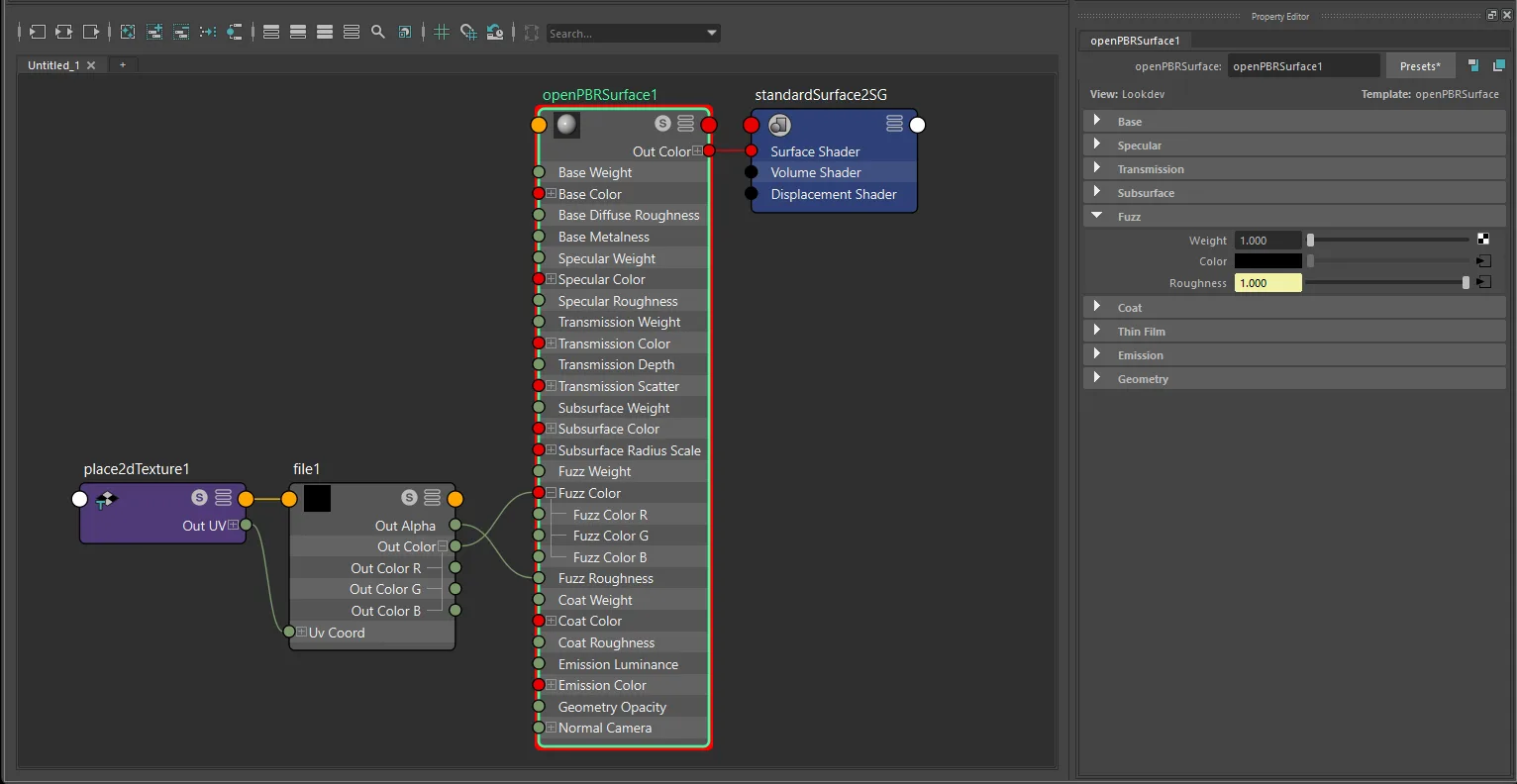
openPBRSurface texture-only sheen setup with file and place2dTexture.
Factor + texture (color tint)
To tint the texture color, use a colorComposite node:
standardSurface · aiStandardSurface:
  aiImage.outColor  ->  colorComposite  ->  shader.sheenColor

openPBRSurface:
  aiImage.outColor  ->  colorComposite  ->  shader.fuzzColor
The color tint exports as sheenColorFactor.
The example below shows the common packed sheen workflow: RGB goes through colorComposite for color tint, while the alpha channel goes through multiplyDivide for roughness scaling.
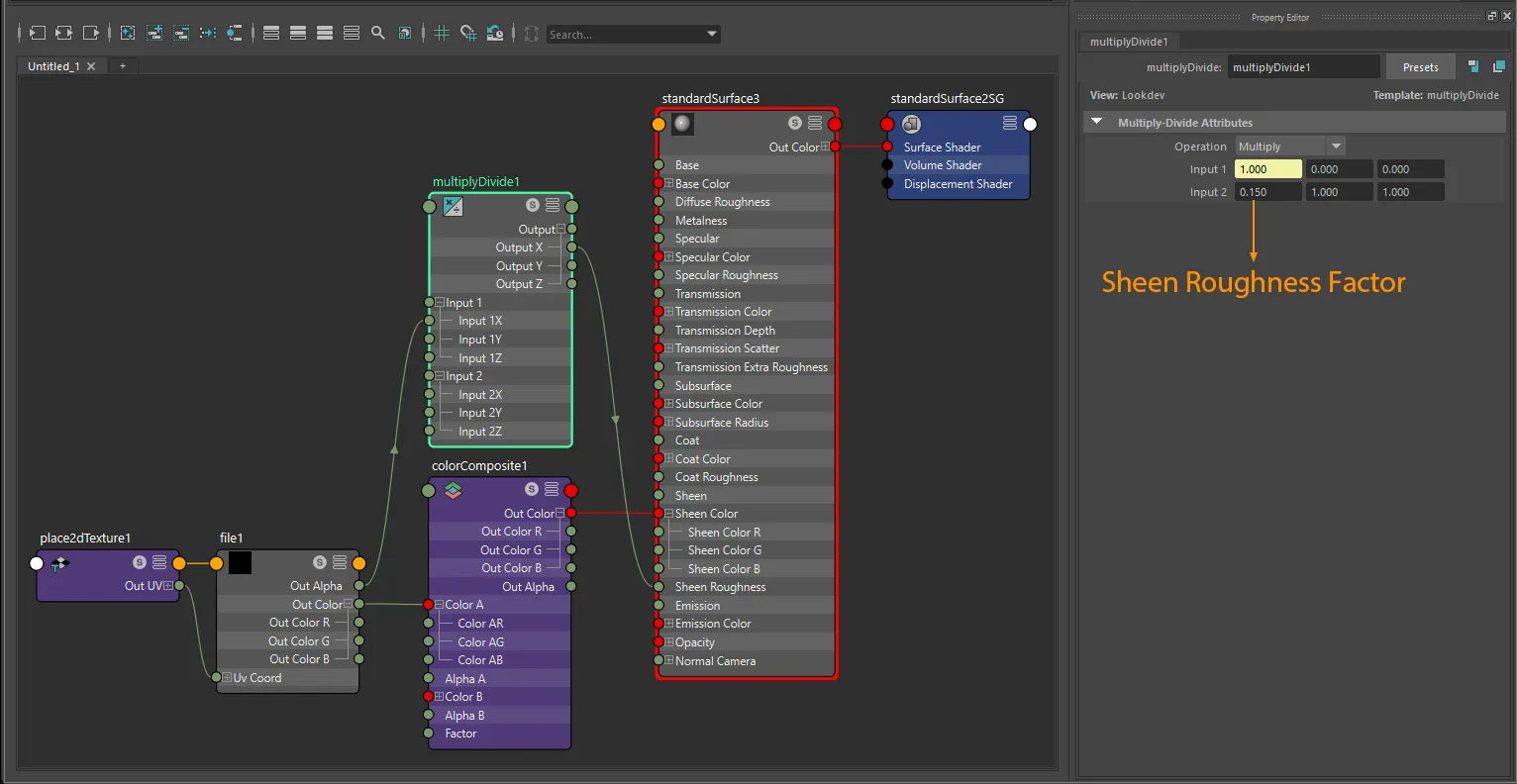
standardSurface factor-plus-texture sheen setup with file, colorComposite, and multiplyDivide.
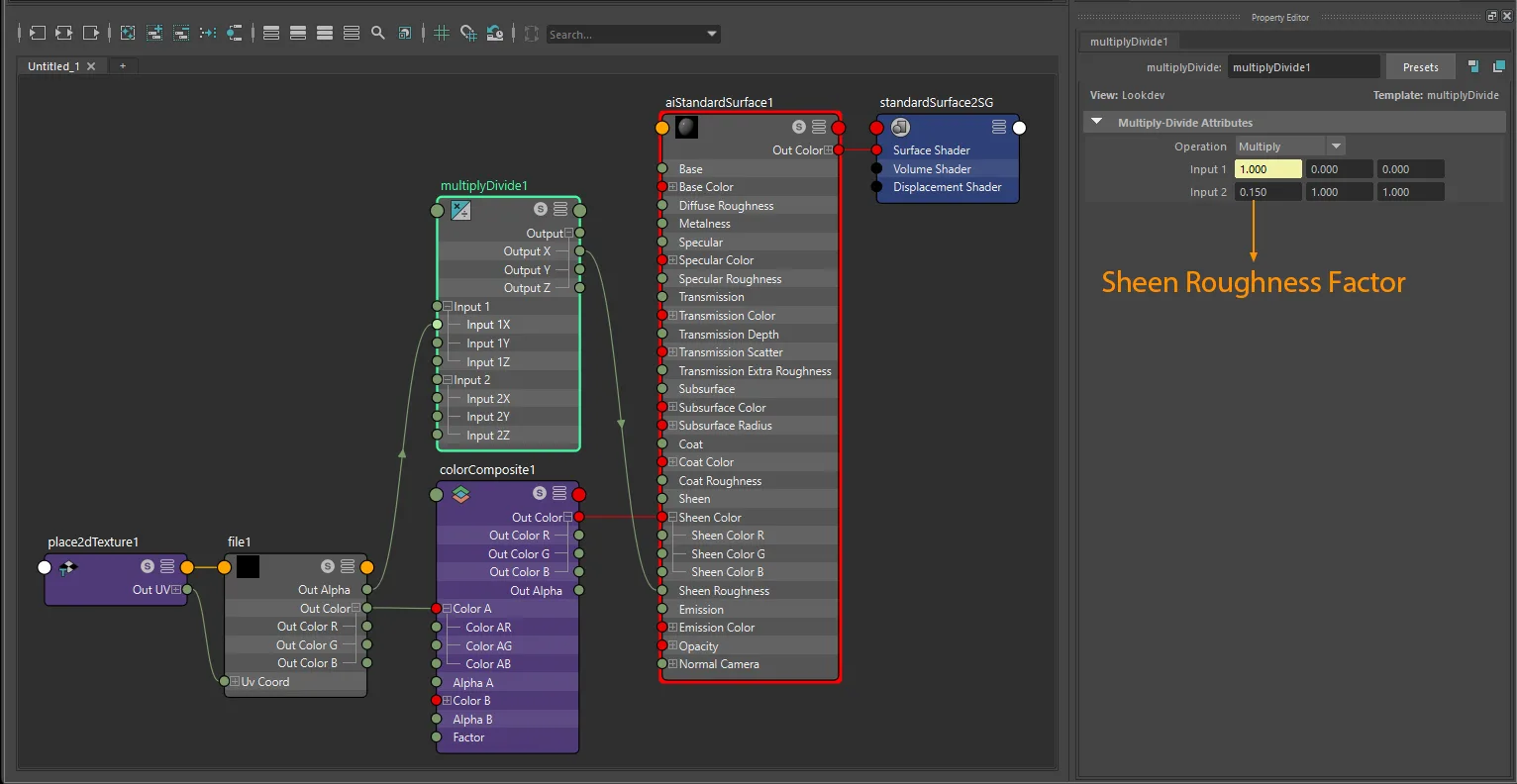
aiStandardSurface factor-plus-texture sheen setup with file, colorComposite, and multiplyDivide.
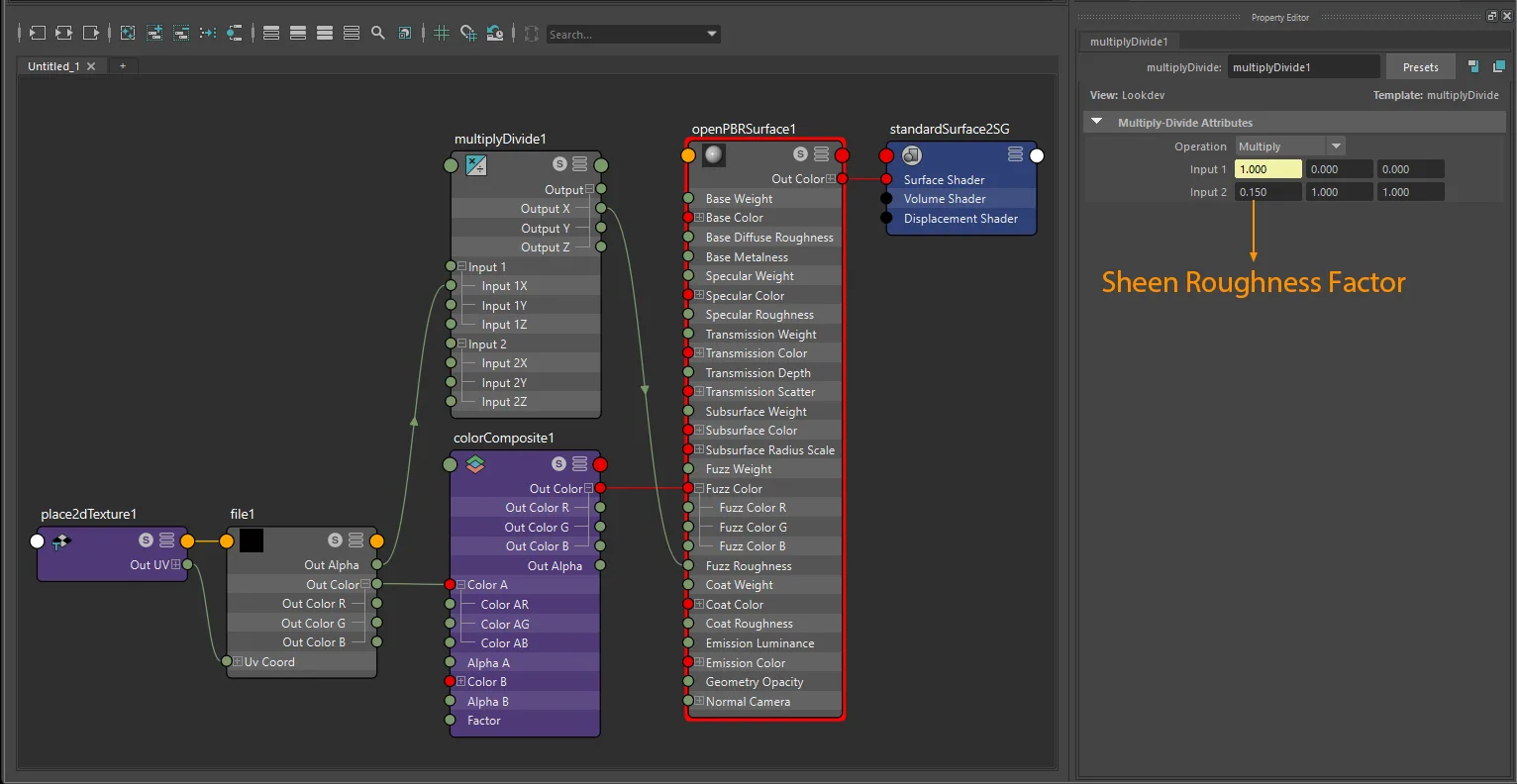
openPBRSurface factor-plus-texture sheen setup with file, colorComposite, and multiplyDivide.
Sheen roughness
Factor only
standardSurface, aiStandardSurface: Set sheenRoughness directly.
openPBRSurface: Set fuzzRoughness directly.
Roughness is only written when the sheen weight gate is also active. Exports as sheenRoughnessFactor.
Packed texture (same image as sheen color)
Use a single RGBA image for both color and roughness:
standardSurface · aiStandardSurface:
  aiImage.outColor  ->  shader.sheenColor
  aiImage.outAlpha  ->  shader.sheenRoughness

openPBRSurface:
  aiImage.outColor  ->  shader.fuzzColor
  aiImage.outAlpha  ->  shader.fuzzRoughness
The exporter detects that both attributes share the same file and exports the RGBA image directly as the combined sheen texture. One texture node feeding both paths is supported, and multiple texture nodes pointing to the same file path are also supported.
For packed RGBA sheen, the source-channel rule is strict even when the multiplyDivide lane is flexible:
- Sheen color must come from the source texture's RGB channels.
- Sheen roughness must come from the source texture's alpha channel.
- One shared
multiplyDividenode or separatemultiplyDividenodes are both supported for roughness. - The
multiplyDividelane can beX,Y, orZ; the exporter follows the real upstream source plug, not a fixed lane name.
Exports as sheenColorTexture and sheenRoughnessTexture pointing to the same image.
Separate textures (auto-combined)
Connect different images for color and roughness. The exporter repacks them into a single RGBA image: color in RGB, roughness in A.
standardSurface · aiStandardSurface:
  textureA.outColor  ->  shader.sheenColor
  textureB.outColorR ->  shader.sheenRoughness

openPBRSurface:
  textureA.outColor  ->  shader.fuzzColor
  textureB.outColorR ->  shader.fuzzRoughness
For a true grayscale sheen roughness source image, outColor, outColorR, outColorG, or outColorB all export equivalently because all RGB channels carry the same value. If a roughness factor is used, the grayscale signal can pass through any one matching multiplyDivide lane: X, Y, or Z.
When both separate maps are present, the exporter generates a packed RGBA sheen texture. Both source images must share the same dimensions.
Single-texture outcomes stay as direct exports:
sheenColorTextureonly: exports the original RGB image directly assheenColorTexture.sheenRoughnessTextureonly: exports the original grayscale image directly assheenRoughnessTexture.sheenColorTexture+sheenRoughnessTexture: generates a packed RGBA texture with RGB = sheen color and A = sheen roughness.
Factor + texture
Use colorComposite for sheen color tint tracing and multiplyDivide for sheen roughness factor tracing.
colorCompositeis the supported tint path forsheenColorFactor/fuzzColortinting.multiplyDivideis the supported factor path forsheenRoughnessFactor/fuzzRoughnessscaling.- For separate grayscale roughness maps, the
multiplyDividelane can beX,Y, orZ. - For packed RGBA sheen, the roughness factor lane is still flexible, but the source texture channel must remain alpha.
UV transform
file nodes: set repeat, wrap, mirror, offset, and rotation on the connected place2dTexture.
aiImage nodes: wrap, scale, and offset export natively; rotation requires a place2dTexture.
UV set: assign via Maya's UV Set Editor or UV Linking - see UV Set Selection for node-type differences.
When color and roughness use a combined texture, the UV transform is read from the color texture node.
Notes
- Sheen color texture is
sRGB; sheen roughness isRaw. The combined RGBA image handles both. - Sheen color uses RGB data; sheen roughness uses alpha or a separate grayscale source.
colorCompositeis used for sheen color tint tracing;multiplyDivideis used for sheen roughness factor tracing.- Shared
multiplyDividevs separatemultiplyDividedoes not matter for sheen roughness export. - Shared texture node vs multiple texture nodes pointing to the same file path does not matter when the packed RGBA source-channel rules are satisfied.
- Matching image size matters only when the exporter has to generate a packed RGBA sheen texture from separate source images.
- Sheen is not exported unless the weight gate (
sheenfor standardSurface/aiStandardSurface,fuzzWeightfor openPBR) is greater than0.0. StingrayPBSdoes not exportKHR_materials_sheen.