Exporter Options
Export File Specific Options
When you select glTF2.0 Export in Maya's export dialog, the right-hand panel exposes exporter-specific controls for mesh output, file format, compression, animation, and metadata.
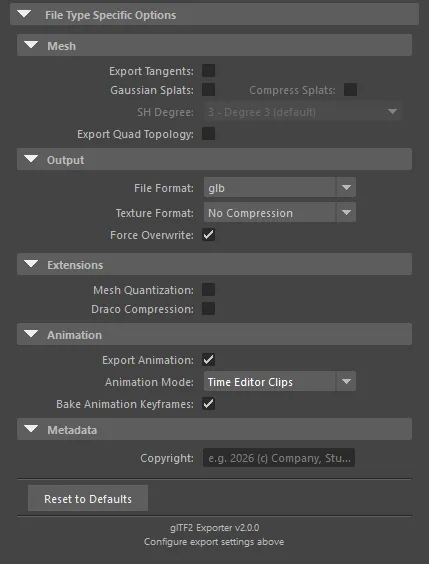
Mesh
- Export Tangents: Off by default. Writes tangent vectors for normal-mapped materials in supporting viewers.
- Gaussian Splats: Off by default. Exports
GaussianSplatLocatornodes throughKHR_gaussian_splattingwhen the companion Gaussian Splats plug-in is loaded (PolyPulse3D; Windows only). - Compress Splats: Off by default. Enabled only when Gaussian Splats is on. Quantizes splat attributes for smaller files.
- SH Degree: Defaults to 3 - Degree 3. Enabled only when Gaussian Splats is on. Caps spherical-harmonic lighting detail written into the splat primitive.
- Export Quad Topology: Off by default. Writes quad topology metadata for Maya-oriented round trips.
Output
- File Format: Defaults to glb. Switch to gltf when you need separate JSON and resource files.
- Texture Format: Defaults to No Compression. Convert textures to WebP, JPEG, or KTX2, or keep source files.
- Force Overwrite: On by default. Overwrites an existing output file without prompting.
Extensions
- Mesh Quantization: Off by default. Enables
KHR_mesh_quantizationfor smaller geometry buffers. - Draco Compression: Off by default. Compresses mesh geometry with Draco.
Animation
- Export Animation: On by default.
- Animation Mode: Defaults to Time Editor Clips. Also supports Scene Keys and Sampled.
- Bake Animation Keyframes: On by default. Recommended with Time Editor Clips for web and real-time viewers.
Metadata
- Copyright: Optional text written to
asset.copyrightin the exported file.
Use Reset to Defaults at the bottom of the panel to restore every option to its plug-in default.
Notes
- These settings apply only to glTF2.0 Export.
- Maya's generic export options outside this section still apply as usual.
- For option-by-option detail, see Export Options.
- For programmatic exports, these options can also be passed through the translator's options string. See Technical Details.