Diffuse Transmission
glTF extension: KHR_materials_diffuse_transmission
glTF properties: diffuseTransmissionFactor · diffuseTransmissionTexture · diffuseTransmissionColorFactor · diffuseTransmissionColorTexture
Diffuse transmission models scattered light passing through a surface (e.g. wax, skin, frosted glass), distinct from the specular/refractive transmission in KHR_materials_transmission. Requires KHR_materials_diffuse_transmission to be enabled in the export options.
| Shader | Weight attribute | Color attribute | Notes |
|---|---|---|---|
standardSurface, aiStandardSurface |
transmission |
transmissionColor |
|
openPBRSurface |
transmissionWeight |
transmissionColor |
Different weight attribute name |
StingrayPBS |
not supported | not supported | - |
Transmission weight
Factor only
Set the weight attribute directly on the shader.
standardSurface,aiStandardSurface: settransmission.openPBRSurface: settransmissionWeight.
Exports as diffuseTransmissionFactor.
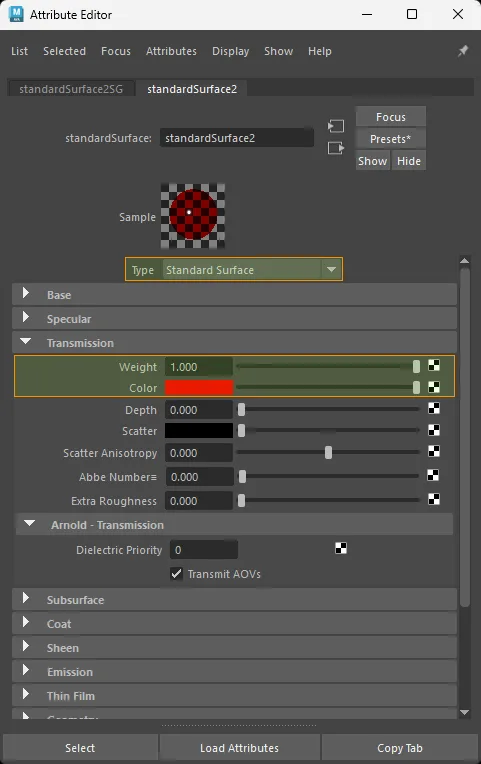
standardSurface factor-only diffuse transmission setup.
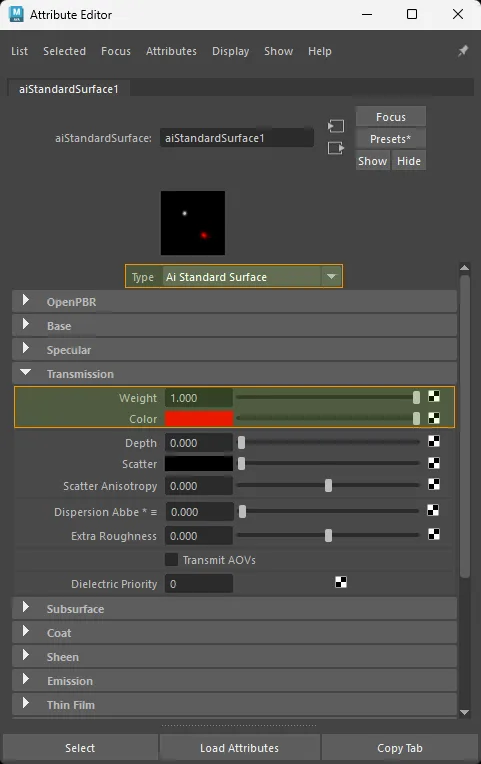
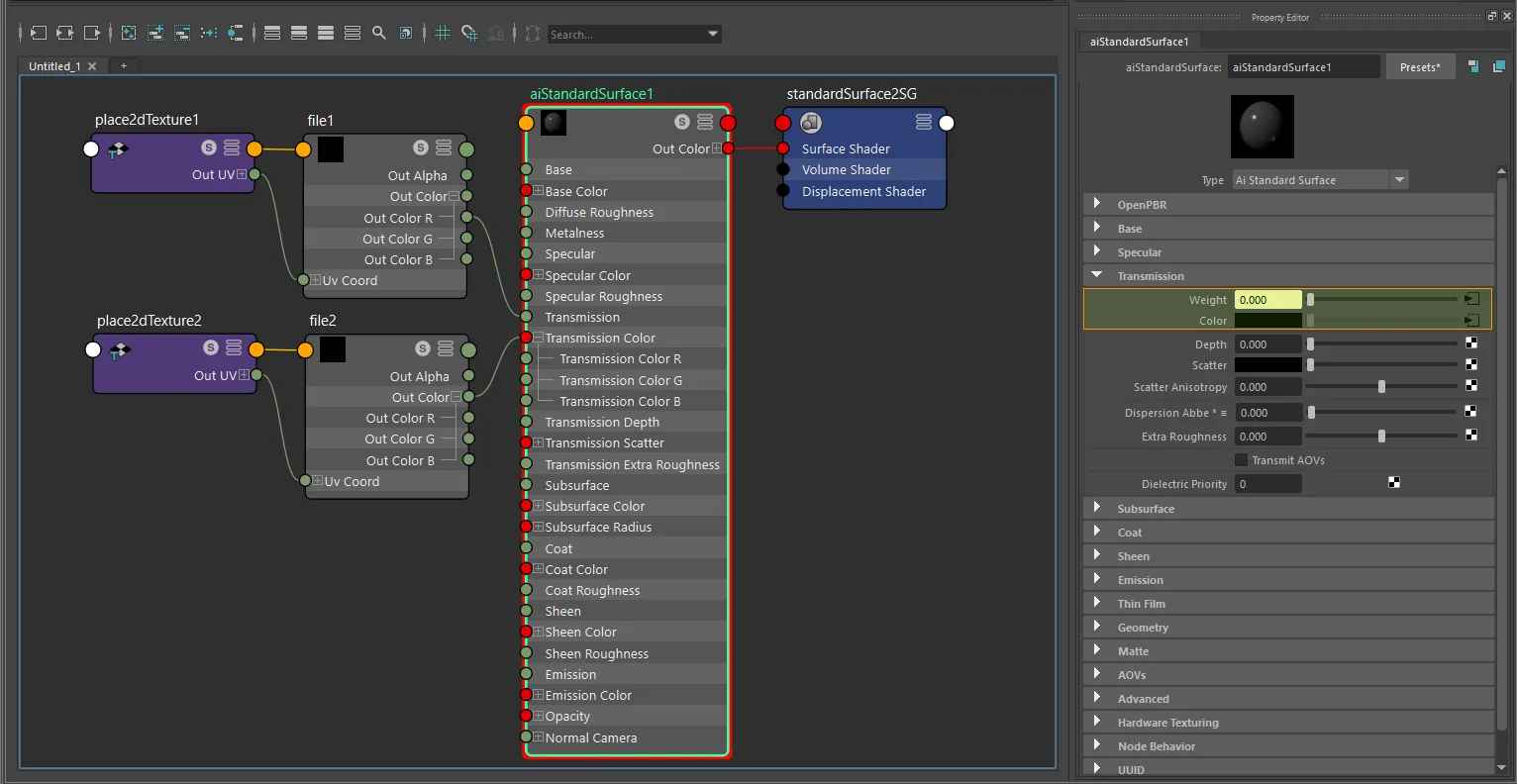
aiStandardSurface factor-only diffuse transmission setup.
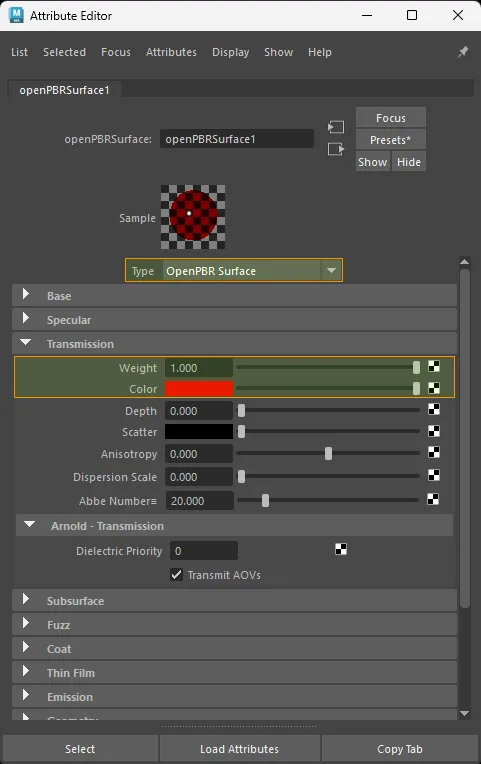
openPBRSurface factor-only diffuse transmission setup.
Note
A plain scalar on transmission or transmissionWeight is also used by classic transmission. To get a diffuse transmission result from a factor-only setup, pair it with a transmissionColor on the same shader. If Auto routing still chooses the wrong extension, set glTF Transmission Color Role to Diffuse Transmission - see gltfTransmissionColorRole.
Texture only
Color space: Raw
standardSurface · aiStandardSurface:
  packed RGBA case:
    aiImage.outAlpha  ->  shader.transmission
    file.outAlpha     ->  shader.transmission

  standalone grayscale case:
    aiImage.outColor / outColorR / outColorG / outColorB  ->  shader.transmission
    file.outColor / outColorR / outColorG / outColorB     ->  shader.transmission

openPBRSurface:
  packed RGBA case:
    aiImage.outAlpha  ->  shader.transmissionWeight
    file.outAlpha     ->  shader.transmissionWeight

  standalone grayscale case:
    aiImage.outColor / outColorR / outColorG / outColorB  ->  shader.transmissionWeight
    file.outColor / outColorR / outColorG / outColorB     ->  shader.transmissionWeight
Exports as diffuseTransmissionTexture. glTF reads diffuse transmission weight from the alpha channel, so standalone grayscale RGB sources are repacked to alpha during export.
When transmissionColor is textured too, the exporter supports both of these authoring patterns:
- Shared RGBA map: one texture node drives
transmissionColorfromoutColorand drives transmission weight fromoutAlpha. The exporter keeps it as one packed glTF texture. - Separate maps: one texture drives
transmissionColor, and a separate grayscale or alpha map drives transmission weight. The exporter packs them into one glTF-compliant RGBA texture at export time.
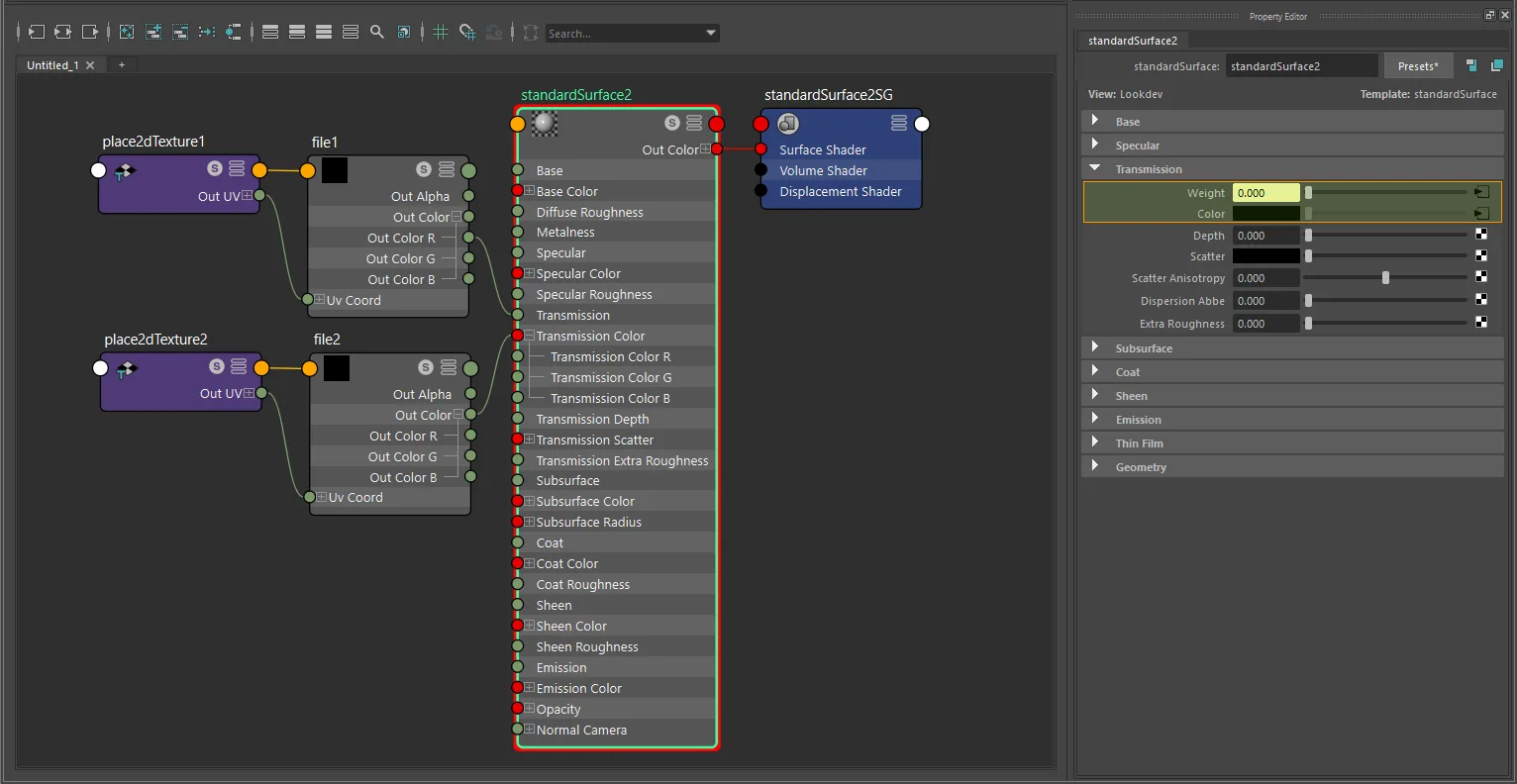
standardSurface texture-only diffuse transmission setup with file and place2dTexture.
aiStandardSurface texture-only diffuse transmission setup with file and place2dTexture.
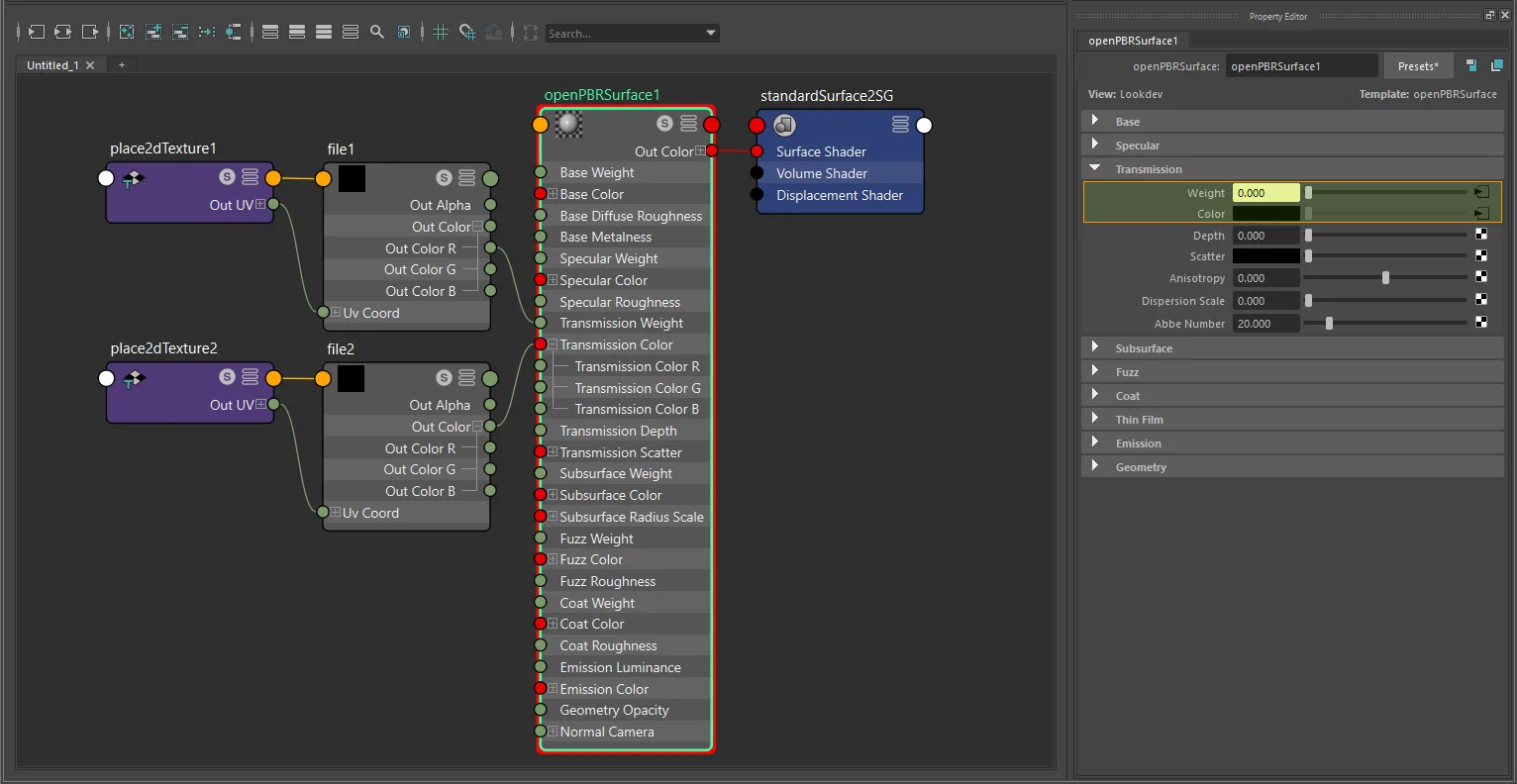
openPBRSurface texture-only diffuse transmission setup with file and place2dTexture.
Note
Use outAlpha when the same texture also carries diffuse transmission color in RGB. For a standalone grayscale weight map, outColor, outColorR, outColorG, and outColorB are all accepted.
Factor + texture
glTF computes: diffuseTransmissionFactor × diffuseTransmissionTexture
- Connect the texture
outAlpha->multiplyDivide.input1X. - Set the multiplier in
multiplyDivide.input2X. - Connect
multiplyDivide.outputX->shader.transmission(ortransmissionWeight).
standardSurface · aiStandardSurface:
  packed RGBA case:
    texture.outAlpha  ->  multiplyDivide.inputX/Y/Z  ->  shader.transmission

  standalone grayscale case:
    texture.outColor / outColorR / outColorG / outColorB  ->  multiplyDivide.inputX/Y/Z  ->  shader.transmission

openPBRSurface:
  packed RGBA case:
    texture.outAlpha  ->  multiplyDivide.inputX/Y/Z  ->  shader.transmissionWeight

  standalone grayscale case:
    texture.outColor / outColorR / outColorG / outColorB  ->  multiplyDivide.inputX/Y/Z  ->  shader.transmissionWeight
The multiplier exports as diffuseTransmissionFactor.
Note
The exporter follows the actual upstream source plug and multiplyDivide lane. For standalone grayscale weight maps, it does not require any specific X/Y/Z lane as long as the connected channel carries the grayscale signal.
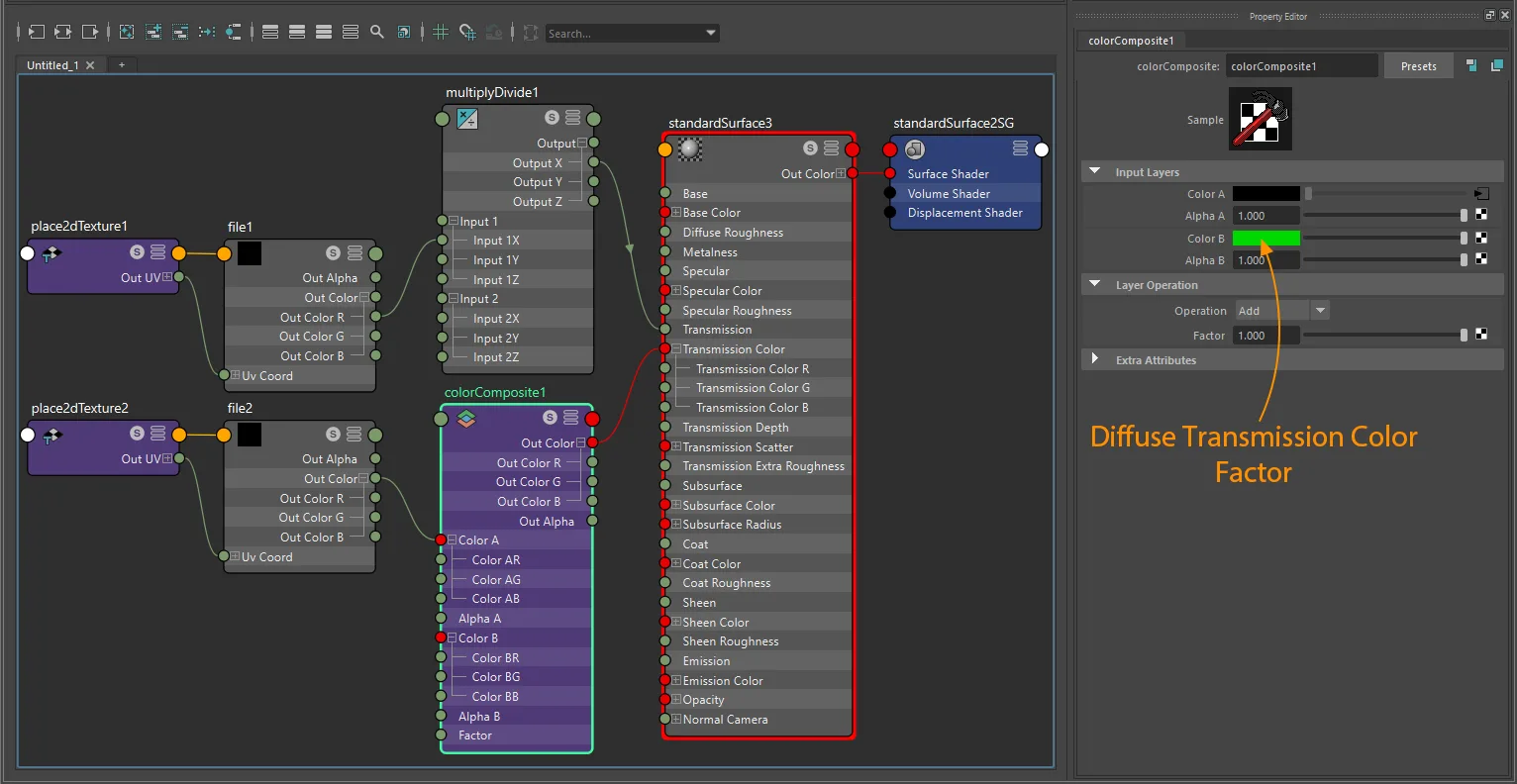
standardSurface factor-plus-texture diffuse transmission setup with file and place2dTexture.
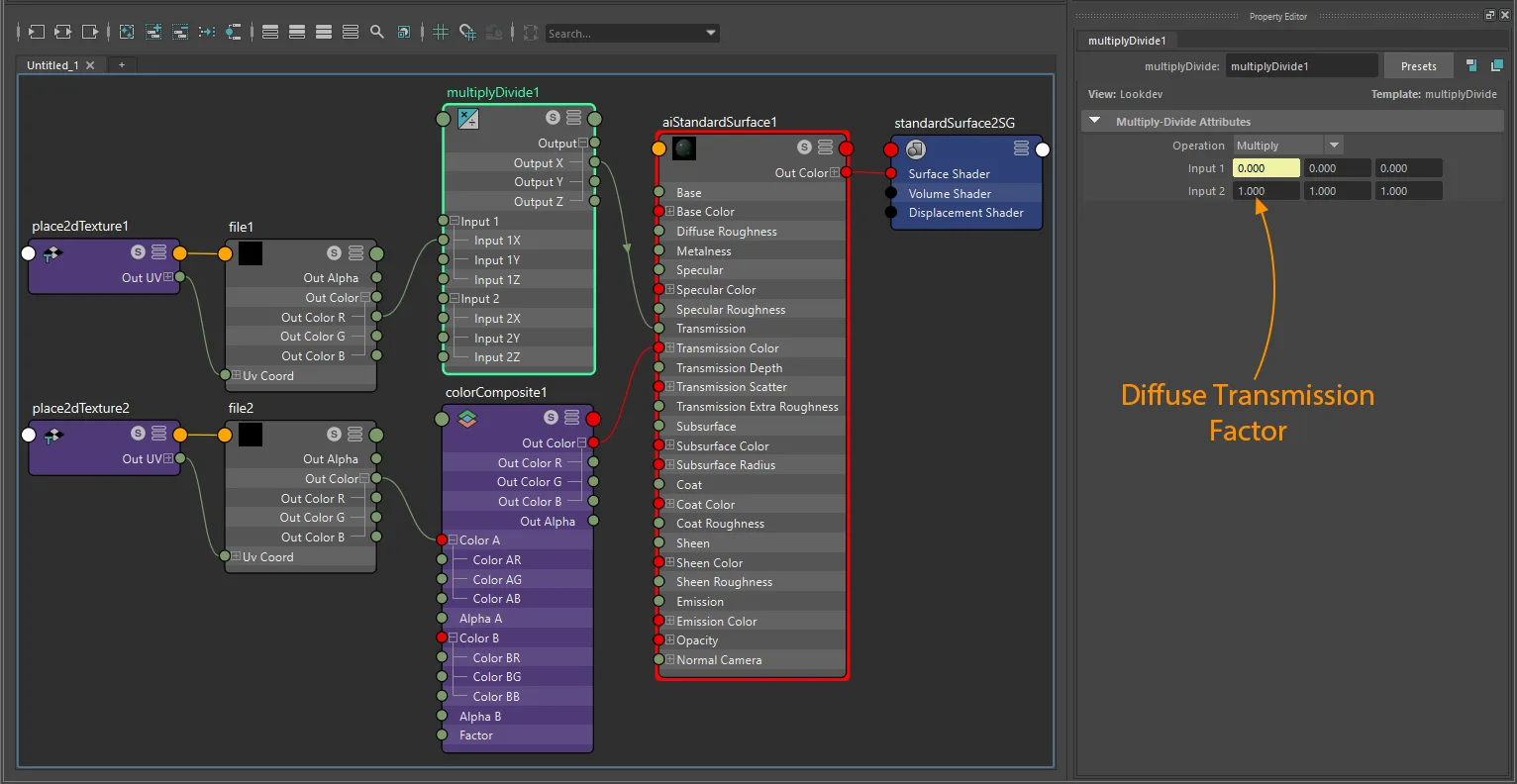
aiStandardSurface factor-plus-texture diffuse transmission setup with file and place2dTexture.
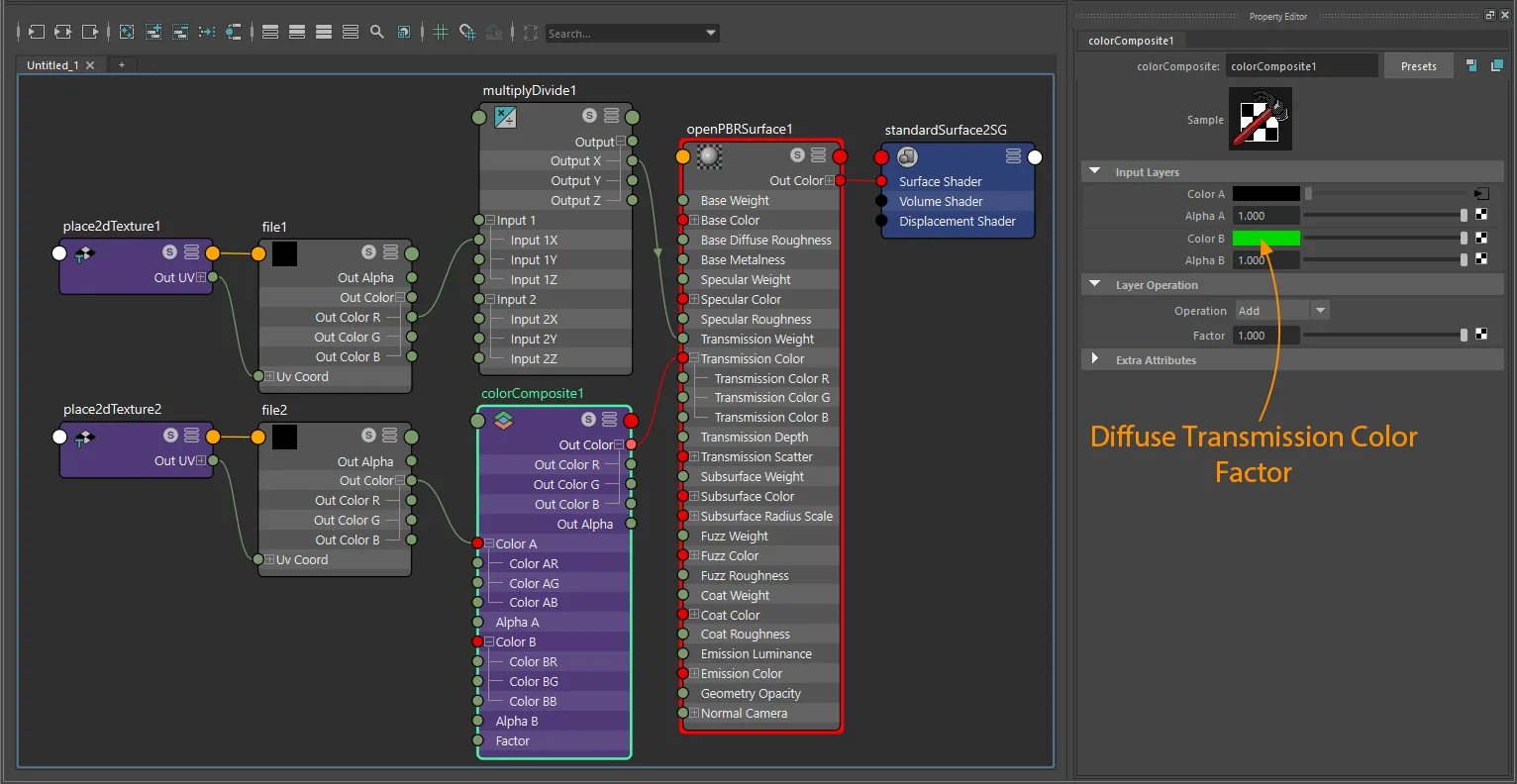
openPBRSurface factor-plus-texture diffuse transmission setup with file and place2dTexture.
Transmission color
Color factor only
Set transmissionColor directly on the shader.
Exports as diffuseTransmissionColorFactor.
Note
This color only participates in the diffuse transmission workflow when paired with a diffuse transmission weight setup. For factor-only ambiguity with volume attenuation, use gltfTransmissionColorRole.
Texture only
Color space: sRGB
standardSurface · aiStandardSurface · openPBRSurface:
  aiImage.outColor  ->  shader.transmissionColor
  file.outColor     ->  shader.transmissionColor
Exports as diffuseTransmissionColorTexture.
If the same texture also drives diffuse transmission weight through outAlpha, the exporter treats it as the packed RGBA case above instead of exporting two unrelated textures.
Color factor + texture (tint)
glTF computes: diffuseTransmissionColorFactor × diffuseTransmissionColorTexture
- Connect
texture.outColor->colorComposite.colorA. - Set the tint on
colorComposite.colorB. - Set
colorCompositeto multiply mode. - Connect
colorComposite.outColor->shader.transmissionColor.
standardSurface · aiStandardSurface · openPBRSurface:
  texture.outColor  ->  colorComposite.colorA  ->  shader.transmissionColor
The tint exports as diffuseTransmissionColorFactor.
Note
Changing the shader swatch while a texture is connected does not create a separate exported tint. Use the colorComposite setup above.
UV transform
file nodes: set repeat, wrap, mirror, offset, and rotation on the connected place2dTexture.
aiImage nodes: wrap, scale, and offset export natively; rotation requires a place2dTexture.
UV set: assign via Maya's UV Set Editor or UV Linking - see UV Set Selection for node-type differences.
Notes
- Diffuse transmission weight is a non-color workflow - use
Rawcolor space. - Diffuse transmission color is a color workflow - use
sRGB. - Packed RGBA diffuse transmission uses the texture alpha channel (
outAlpha) for weight; standalone grayscale weight maps may useoutColor,outColorR,outColorG, oroutColorBbecause they carry the same value. - Shared RGBA graphs and separate color-plus-weight graphs are both supported. Separate inputs are packed to one RGBA texture for glTF export when both diffuse transmission slots are textured.
- Standalone grayscale weight maps can pass through any multiplyDivide output lane; the exporter follows the real upstream plug instead of requiring a fixed X/Y/Z lane.
standardSurface/aiStandardSurfaceusetransmissionfor weight;openPBRSurfaceusestransmissionWeight.StingrayPBSdoes not exportKHR_materials_diffuse_transmission.