Specular
glTF extension: KHR_materials_specular
glTF properties: specularFactor · specularTexture · specularColorFactor · specularColorTexture
Specular provides additional control over the Fresnel / F0 reflectance of a dielectric PBR material. specularFactor scales the overall specular intensity; specularColorFactor tints the specular highlight color. Requires KHR_materials_specular to be enabled in the export options.
| Shader | Factor attr | Color attr |
|---|---|---|
standardSurface, aiStandardSurface |
specular |
specularColor |
openPBRSurface |
specularWeight |
specularColor |
StingrayPBS |
not supported | not supported |
Specular intensity
Factor only
standardSurface, aiStandardSurface: Set specular on the shader.
openPBRSurface: Set specularWeight.
Only written when the value differs from the default 1.0 by more than 0.001. Exports as specularFactor.
Valid glTF specularFactor values are in the range [0, 1]. Values authored above 1.0 are clamped back to 1.0 on export.
The examples below show the full specular authoring setup for each shader. For this factor-only case, focus on the scalar specular weight and the matching specular color swatch.
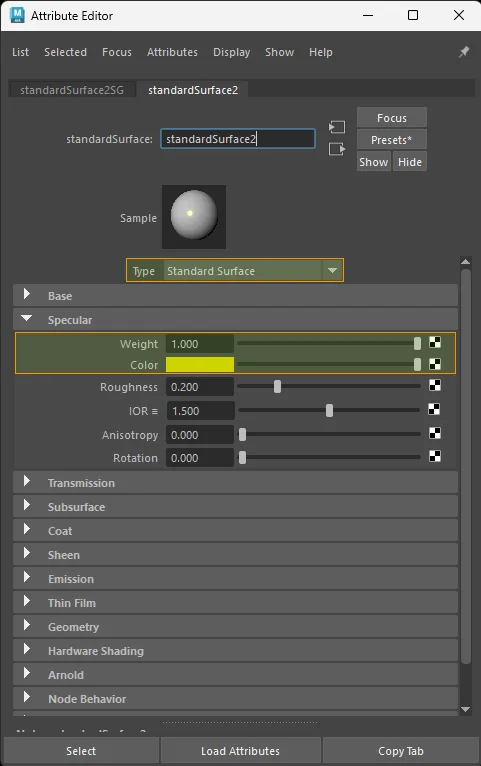
standardSurface factor-only specular setup.
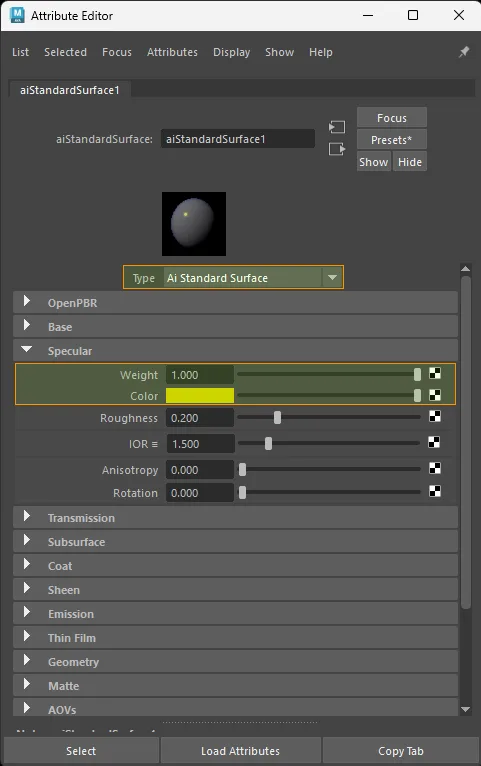
aiStandardSurface factor-only specular setup.
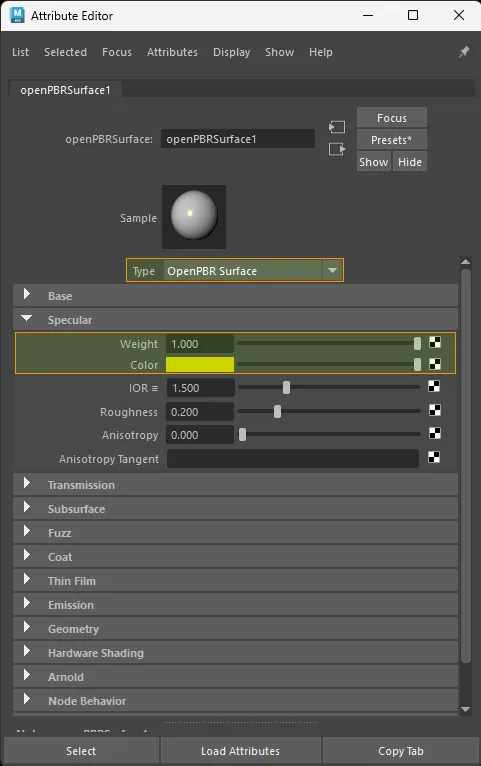
openPBRSurface factor-only specular setup.
Texture only
Color space: Raw
For a standalone grayscale specular-strength image, connect the grayscale signal to the factor attribute:
standardSurface · aiStandardSurface:
  aiImage.outColorR  ->  shader.specular
  file.outColorR     ->  shader.specular

openPBRSurface:
  aiImage.outColorR  ->  shader.specularWeight
  file.outColorR     ->  shader.specularWeight
For a true grayscale source image, outColor, outColorR, outColorG, or outColorB all export equivalently because the RGB channels carry the same value.
Exports as specularTexture.
The examples below show the paired KHR_materials_specular workflow: specular strength on a grayscale path and specular color on an RGB path.
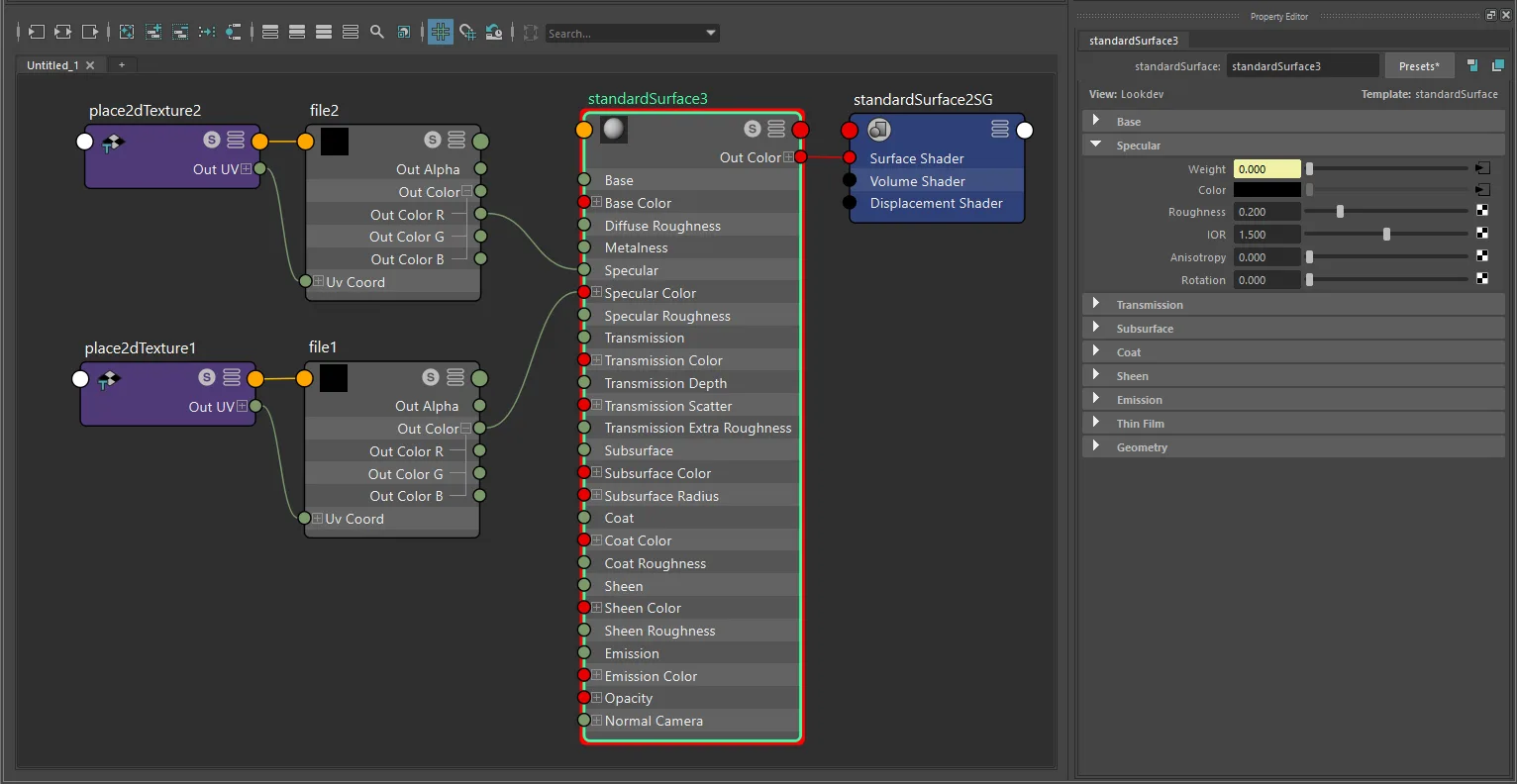
standardSurface texture-only specular setup with file and place2dTexture.
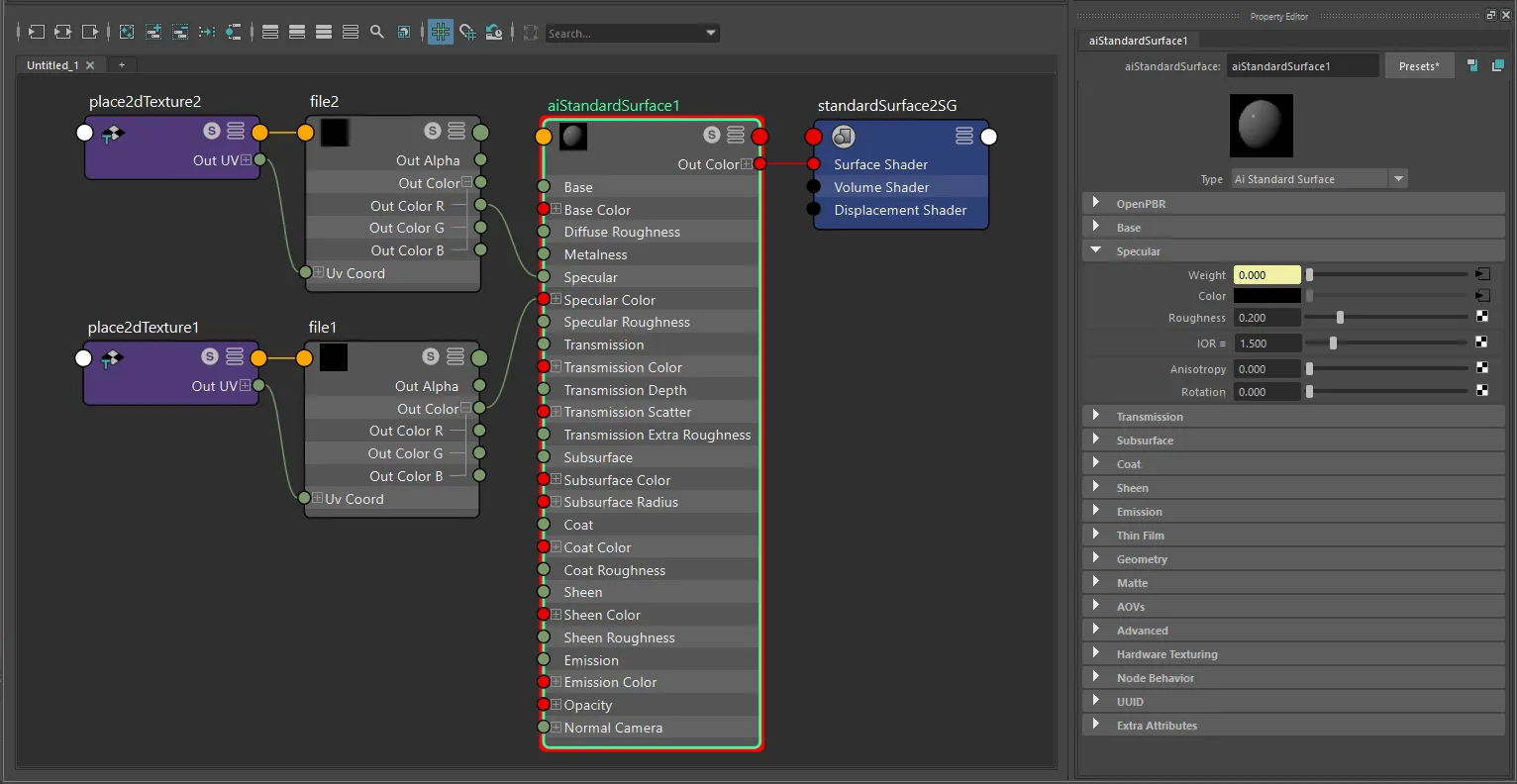
aiStandardSurface texture-only specular setup with file and place2dTexture.
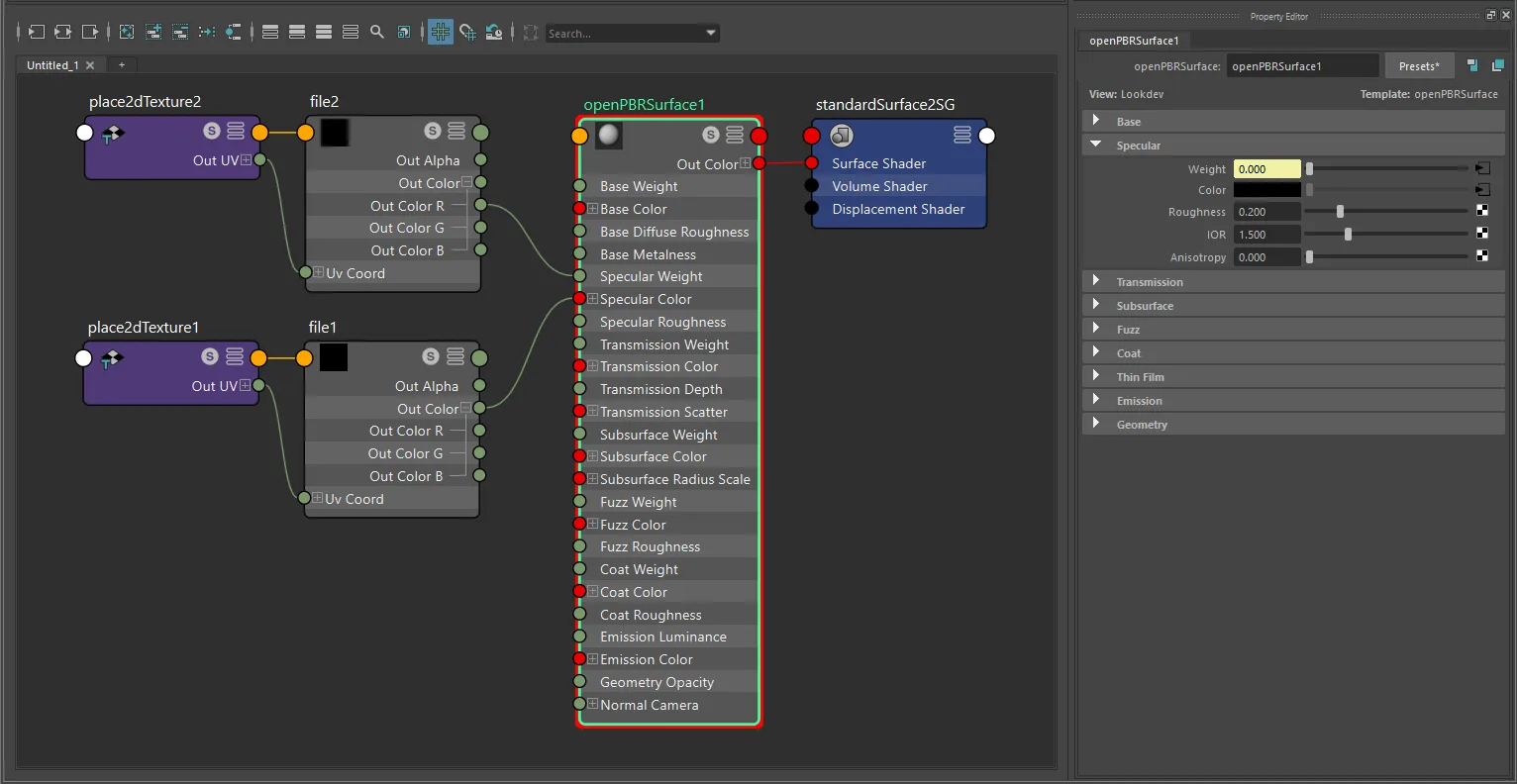
openPBRSurface texture-only specular setup with file and place2dTexture.
Factor + texture
glTF computes: specularFactor × specularTexture
For a standalone grayscale specular-strength map, the signal can pass through any one multiplyDivide lane:
- Connect the grayscale texture into one lane of
multiplyDivide.input1X,input1Y, orinput1Z. - Set the matching scalar factor in
multiplyDivide.input2X,input2Y, orinput2Z. - Connect the matching
multiplyDivide.outputX,outputY, oroutputZ->shader.specular(orspecularWeight).
The exporter follows the real upstream source plug, so lane choice does not need to be X when the source image is grayscale.
The multiplier exports as specularFactor.
The examples below show the common paired setup: multiplyDivide scales the scalar specular texture, while the specular color path is tinted separately as described in the next section.
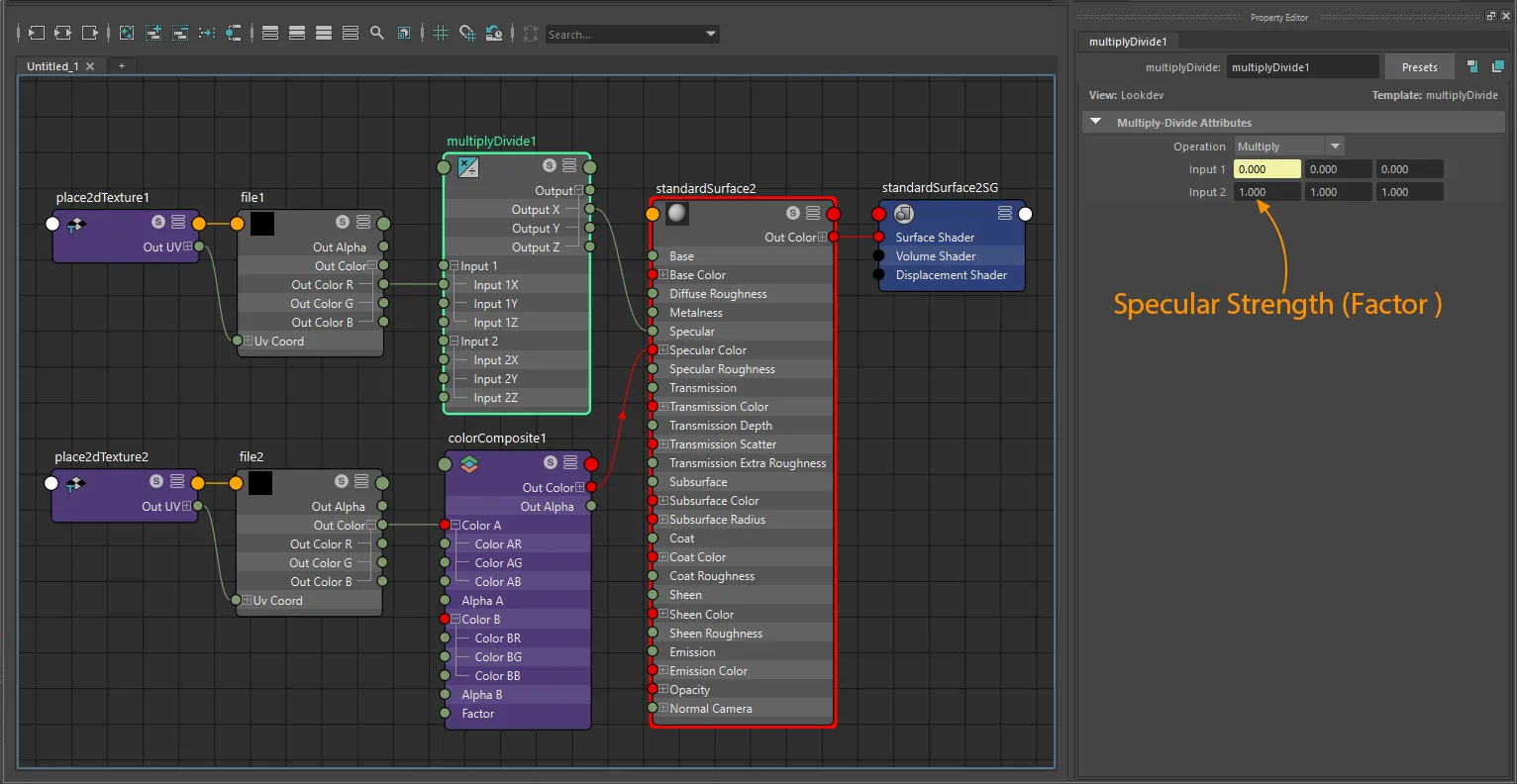
standardSurface factor-plus-texture specular setup with file, multiplyDivide, and color tinting.
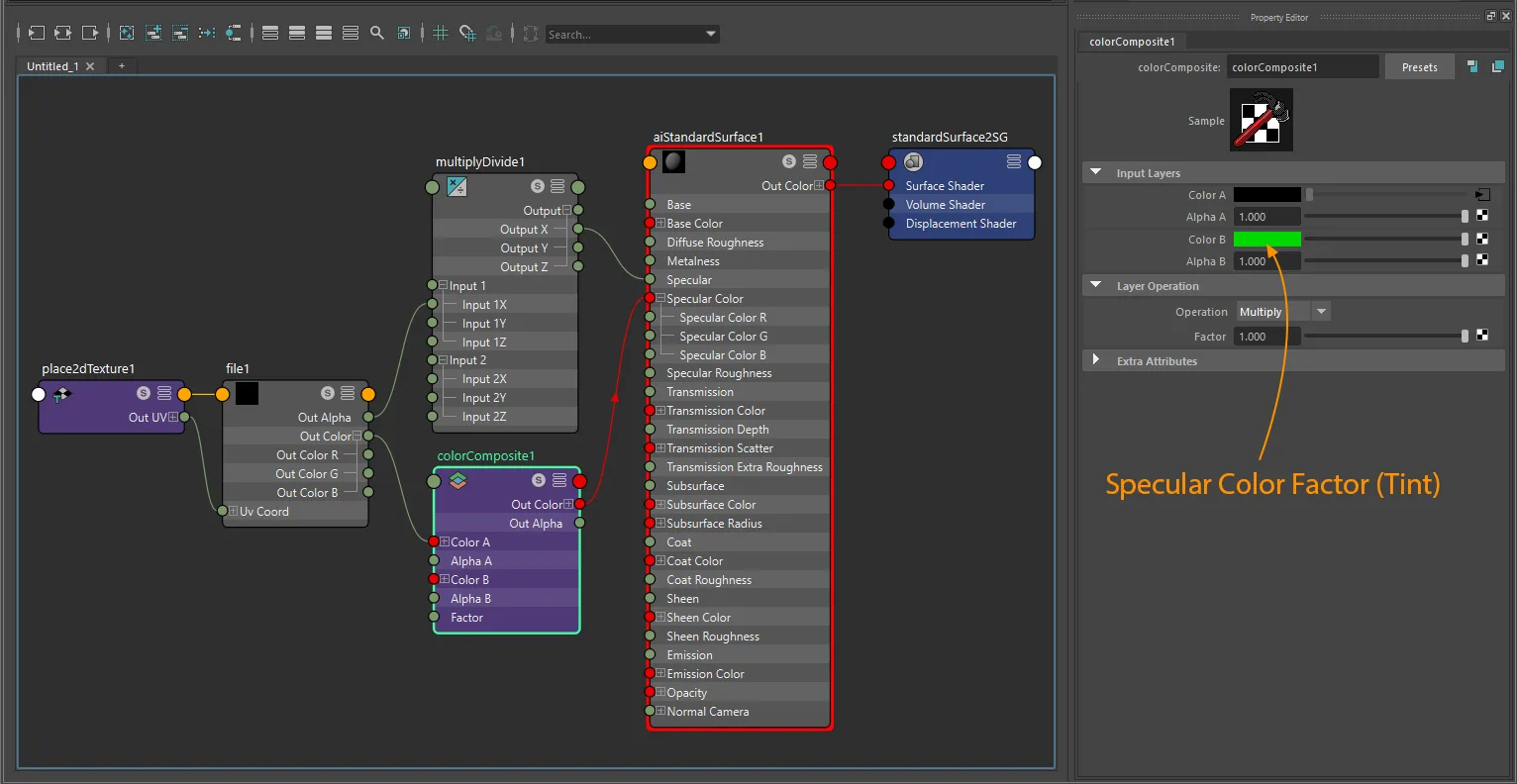
aiStandardSurface factor-plus-texture specular setup with file, multiplyDivide, and color tinting.
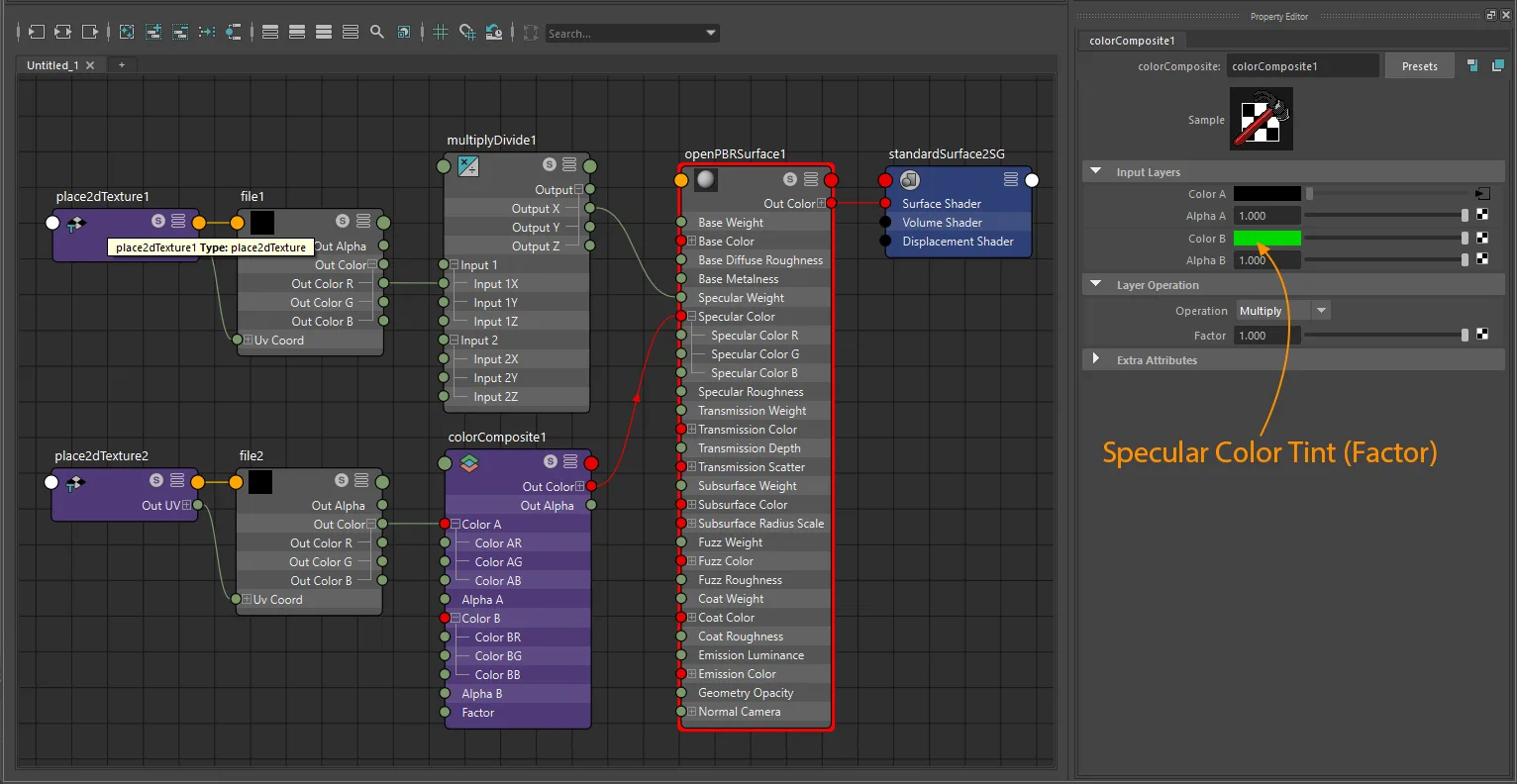
openPBRSurface factor-plus-texture specular setup with file, multiplyDivide, and color tinting.
Specular color
Factor only
Both standardSurface/aiStandardSurface and openPBRSurface use specularColor.
Only written when the value is not default white [1, 1, 1]. Exports as specularColorFactor.
Unlike specularFactor, specularColorFactor is allowed to exceed white. The exporter preserves values above 1.0 and only clamps negative channels up to 0.0.
Texture only
Color space: sRGB
Connect the RGB texture to specularColor:
standardSurface · aiStandardSurface · openPBRSurface:
  aiImage.outColor  ->  shader.specularColor
  file.outColor     ->  shader.specularColor
Exports as specularColorTexture.
Factor + texture (color tint)
To tint the specular color texture, use a colorComposite node:
standardSurface · aiStandardSurface · openPBRSurface:
  aiImage.outColor  ->  colorComposite  ->  shader.specularColor
  file.outColor     ->  colorComposite  ->  shader.specularColor
The tint color comes from colorComposite.colorB and exports as specularColorFactor.
Texture layouts
Separate textures
specularTexturecan come from its own grayscale image.specularColorTexturecan come from its own RGB image.specularTextureusesmultiplyDividefor factor tracing.specularColorTextureusescolorCompositefor tint tracing.
Separate texture outcomes
specularTextureonly: the exporter writes an alpha-bearing texture where Alpha storesspecularTexture, so the result is glTF-compliant even when the Maya source is a grayscale RGB image.specularColorTextureonly: exports the original RGB image directly asspecularColorTexture.specularTexture+specularColorTexture: the exporter generates a packed RGBA image where RGB storesspecularColorTextureand Alpha storesspecularTexture. Both source images must have matching dimensions, and the generated output must use an alpha-capable format.
Packed RGBA specular map
One texture node feeding all channels is supported, and multiple texture nodes pointing to the same file path are also supported.
The authored source image does not need to be PNG. What matters is that the shared texture really carries RGB color plus alpha strength, and that any generated packed output is written to an alpha-capable format.
For a packed RGBA specular map:
- Specular color must come from the source texture's RGB channels.
- Specular strength must come from the source texture's Alpha channel.
specularColorTexturestill usescolorCompositefor tint tracing.specularTexturemay use one sharedmultiplyDividenode or a separatemultiplyDividenode.- The
multiplyDividelane can beX,Y, orZ; the upstream source channel must still remain Alpha for packed specular strength.
If one Maya texture file feeds both color and strength but the strength is taken from grayscale RGB instead of Alpha, the exporter repacks that source into a new spec-compliant RGBA texture rather than exporting the invalid channel layout directly.
UV transform
file nodes: set repeat, wrap, mirror, offset, and rotation on the connected place2dTexture.
aiImage nodes: wrap, scale, and offset export natively; rotation requires a place2dTexture.
UV set: assign via Maya's UV Set Editor or UV Linking - see UV Set Selection for node-type differences.
Notes
specularTextureis scalar data and usesRaw;specularColorTextureis RGB color data and usessRGB.- For standalone grayscale specular-strength maps, the exporter is permissive about grayscale RGB source channel and
multiplyDividelane choice. - The exported glTF is strict about source-channel meaning: RGB =
specularColorTexture, Alpha =specularTexture. - When both separate textures are present, matching image size matters because the exporter generates a packed RGBA specular image.
- Strength-only specular exports are also rewritten to an alpha-bearing output so
specularTextureremains stored in alpha. - A generated packed specular image is written to an alpha-capable output format. In practice that means JPEG is not used for the packed result.
specularFactoris only written when it differs from the default1.0, and exported values stay in the glTF schema range[0, 1].specularColorFactoris only written when the color is not white[1, 1, 1]. Values above1.0are valid and preserved; only negative channels are clamped to0.0.openPBRSurfaceusesspecularWeightinstead ofspecularfor the intensity attribute; both shaders sharespecularColorfor the color attribute.StingrayPBSdoes not exportKHR_materials_specular.