Iridescence
glTF extension: KHR_materials_iridescence
glTF properties: iridescenceFactor · iridescenceTexture · iridescenceIor · iridescenceThicknessMinimum · iridescenceThicknessMaximum · iridescenceThicknessTexture
Iridescence simulates thin-film interference effects that produce rainbow-like color shifts depending on viewing angle (e.g., soap bubbles, oil slicks, beetle wings). Requires KHR_materials_iridescence to be enabled in the export options.
| Shader | Weight attr | Thickness attr | IOR attr |
|---|---|---|---|
standardSurface, aiStandardSurface |
thinFilmWeight (custom - added by plugin) |
thinFilmThickness |
thinFilmIOR |
openPBRSurface |
thinFilmWeight (native) |
thinFilmThickness |
thinFilmIOR |
StingrayPBS |
not supported | not supported | not supported |
In glTF, iridescence weight and thickness share one texture image:
| Channel | Data |
|---|---|
| R | Iridescence weight (factor) |
| G | Iridescence thickness |
Iridescence intensity
Factor only
openPBRSurface: Set thinFilmWeight directly on the shader.
standardSurface, aiStandardSurface: The plugin automatically adds a thinFilmWeight attribute (float, 0-1) to all standard surface shaders on load. It appears in the Extra Attributes section of the Attribute Editor. Set it there.
Note
thinFilmWeight is a plugin-managed export attribute for standardSurface / aiStandardSurface - it has no effect on the Maya viewport or Arnold rendering.
Only exported when the value is greater than 0.0. Exports as iridescenceFactor.
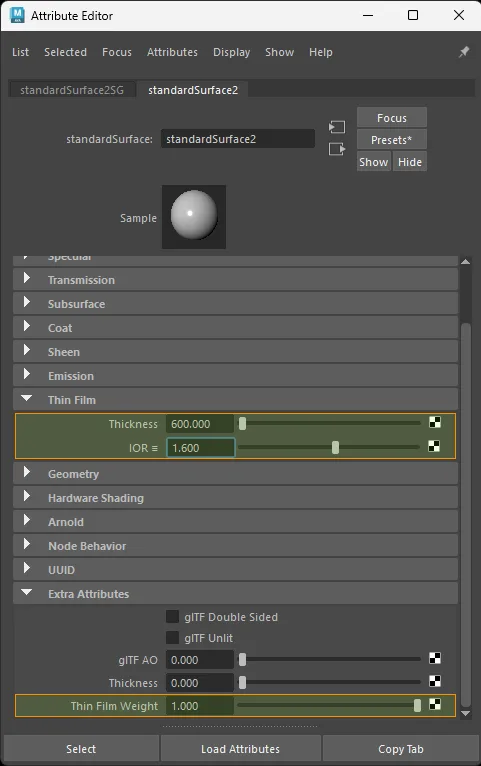
standardSurface factor-only iridescence setup.
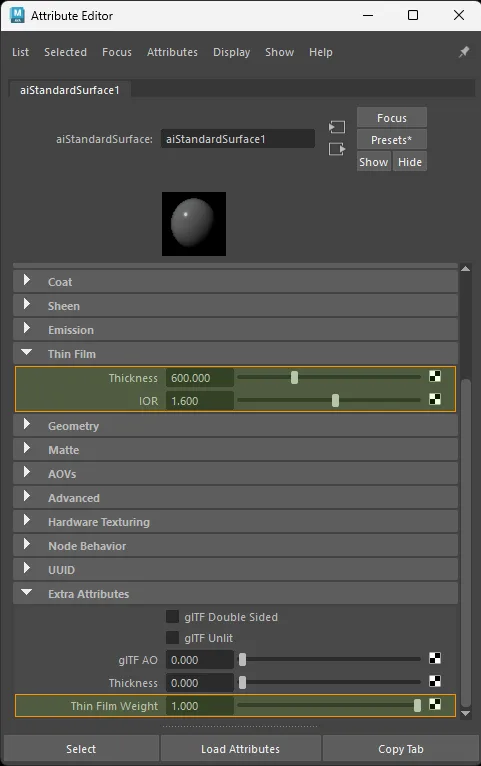
aiStandardSurface factor-only iridescence setup.
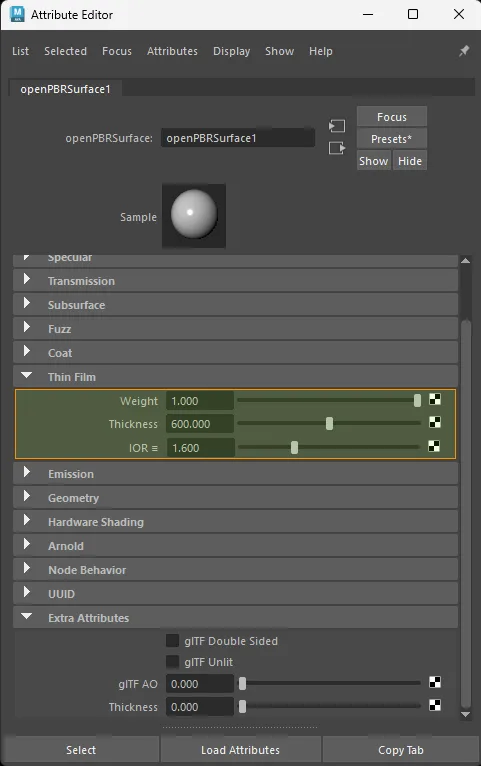
openPBRSurface factor-only iridescence setup.
Texture only
Color space: Raw
standardSurface · aiStandardSurface · openPBRSurface:
  aiImage.outColorR  ->  shader.thinFilmWeight
  file.outColorR     ->  shader.thinFilmWeight
Exports as iridescenceTexture (R channel).
For a true grayscale source image, outColor, outColorR, outColorG, or outColorB all export equivalently. The examples above use outColorR to mirror glTF's iridescence weight channel.
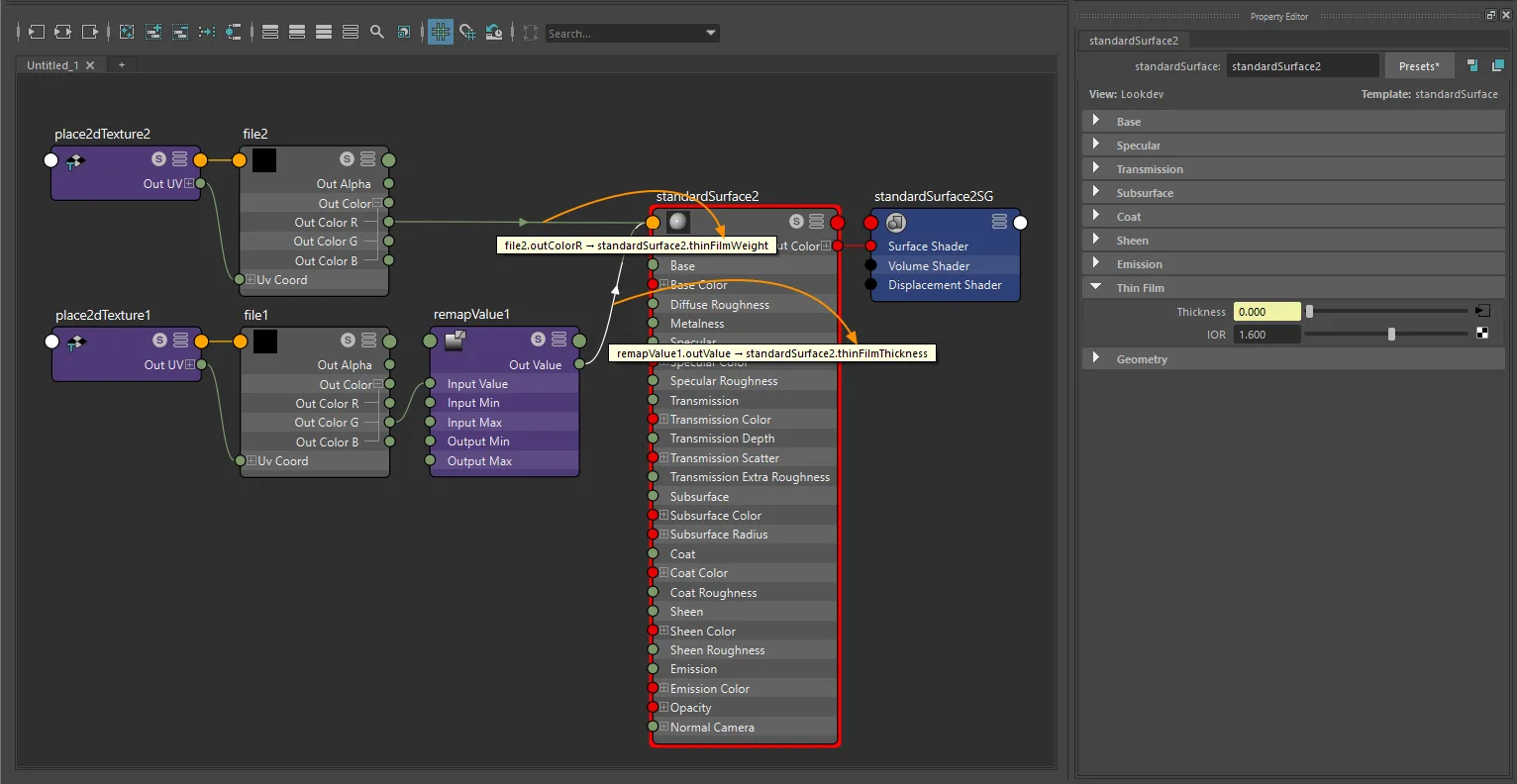
standardSurface texture-only iridescence setup with file and place2dTexture.
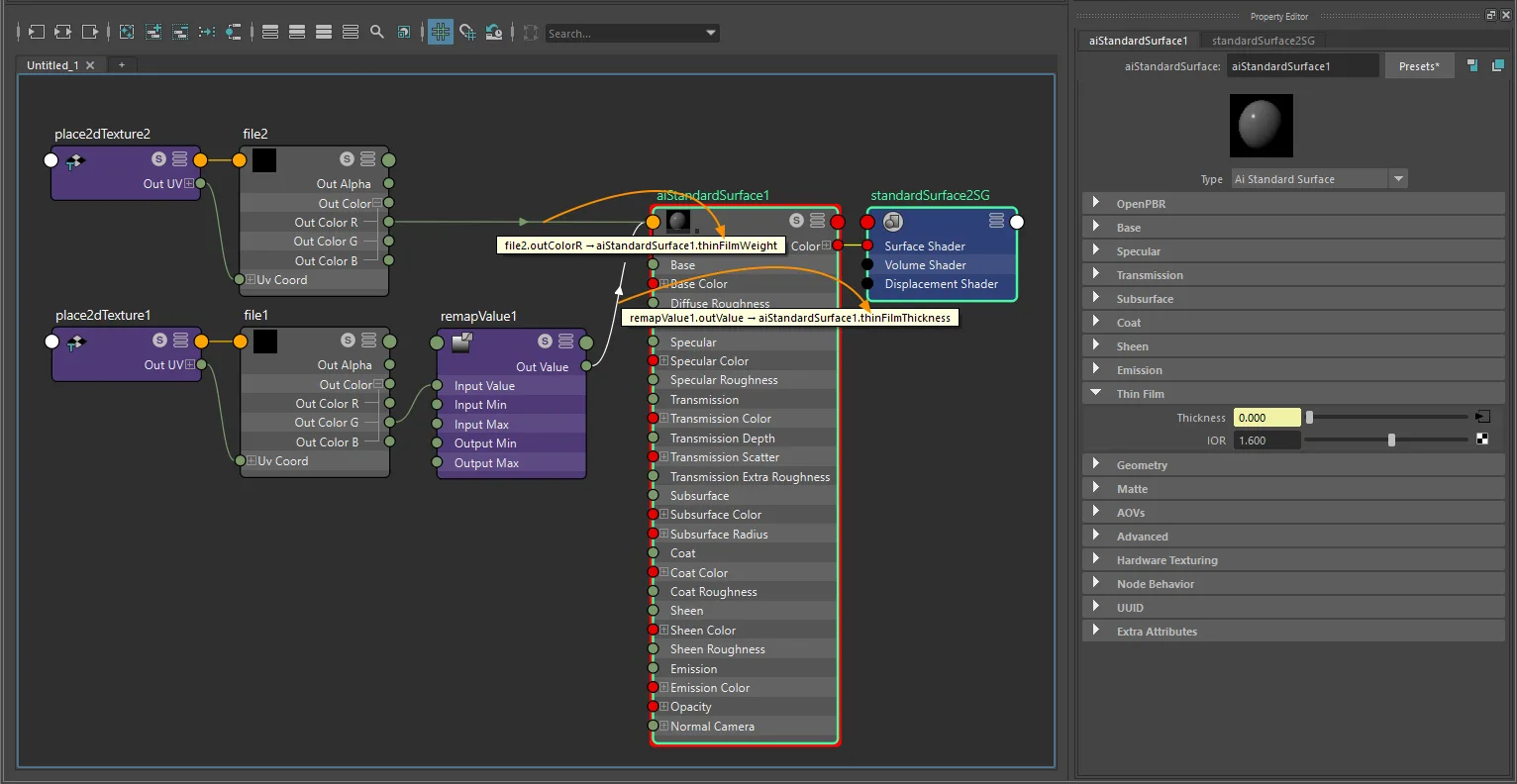
aiStandardSurface texture-only iridescence setup with file and place2dTexture.
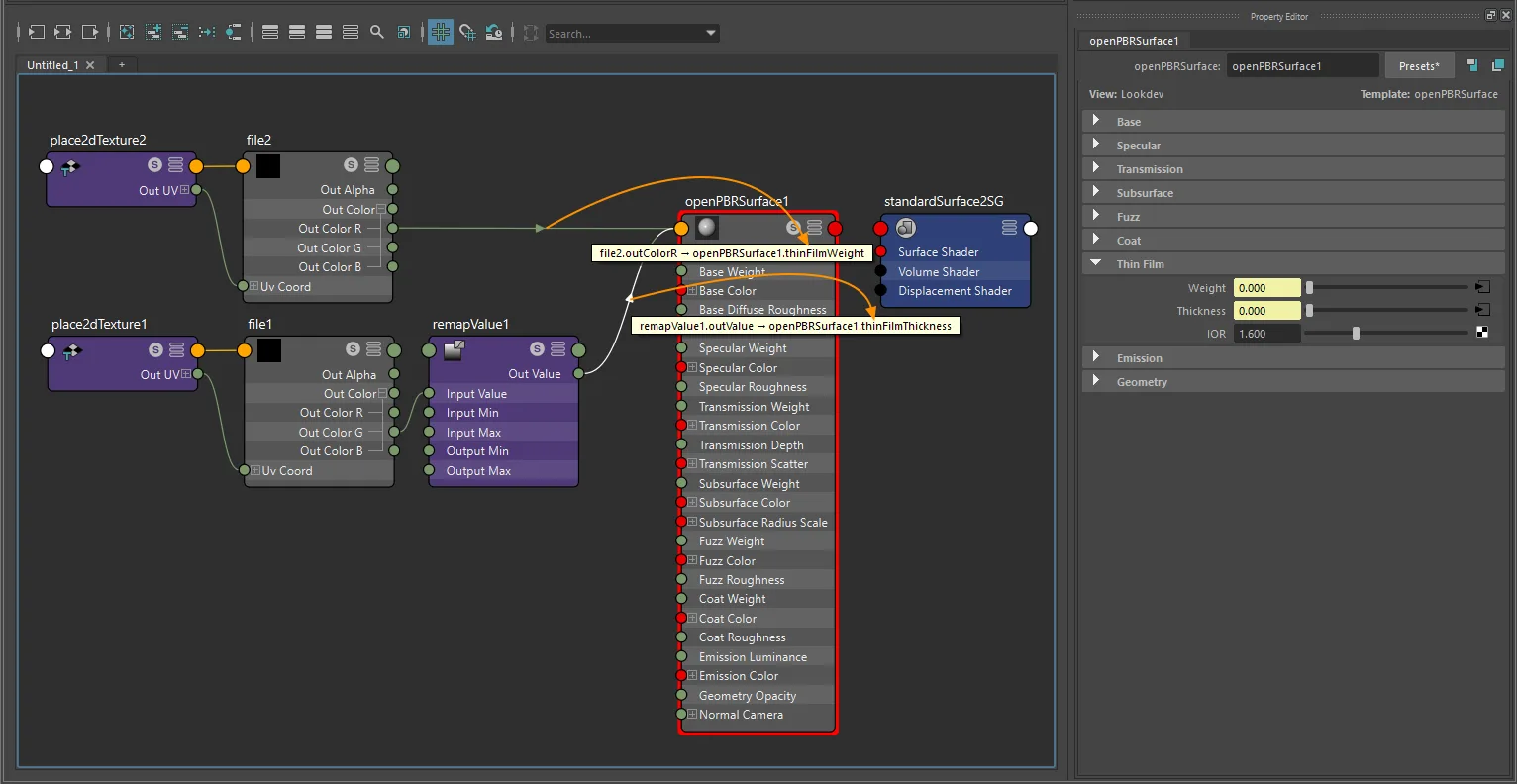
openPBRSurface texture-only iridescence setup with file and place2dTexture.
Factor + texture
glTF computes: iridescenceFactor × iridescenceTexture.R
For a dedicated grayscale iridescence-weight map, any one multiplyDivide lane can be used:
- Connect the grayscale texture into one lane of
multiplyDivide.input1X,input1Y, orinput1Z. - Set the matching weight multiplier on
multiplyDivide.input2X,input2Y, orinput2Z. - Connect the matching
multiplyDivide.outputX,outputY, oroutputZ->shader.thinFilmWeight.
For true grayscale sources, outColor, outColorR, outColorG, or outColorB can feed that lane. One shared multiplyDivide node or separate multiplyDivide nodes are both supported. The exporter follows the real upstream source plug, so lane choice does not need to be X unless you are intentionally mirroring glTF's packed iridescence texture layout.
The multiplier exports as iridescenceFactor.
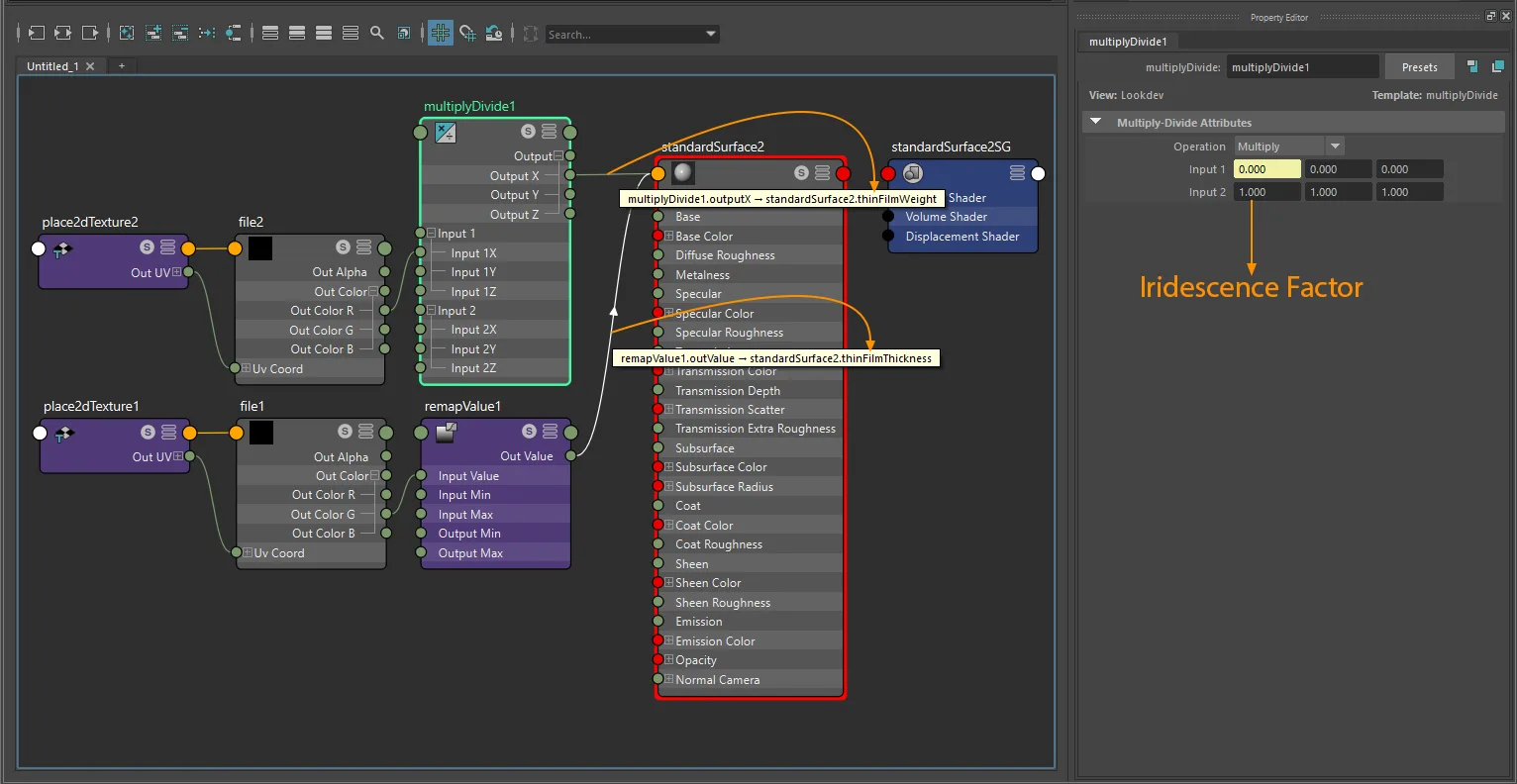
standardSurface factor-plus-texture iridescence setup with file and place2dTexture.
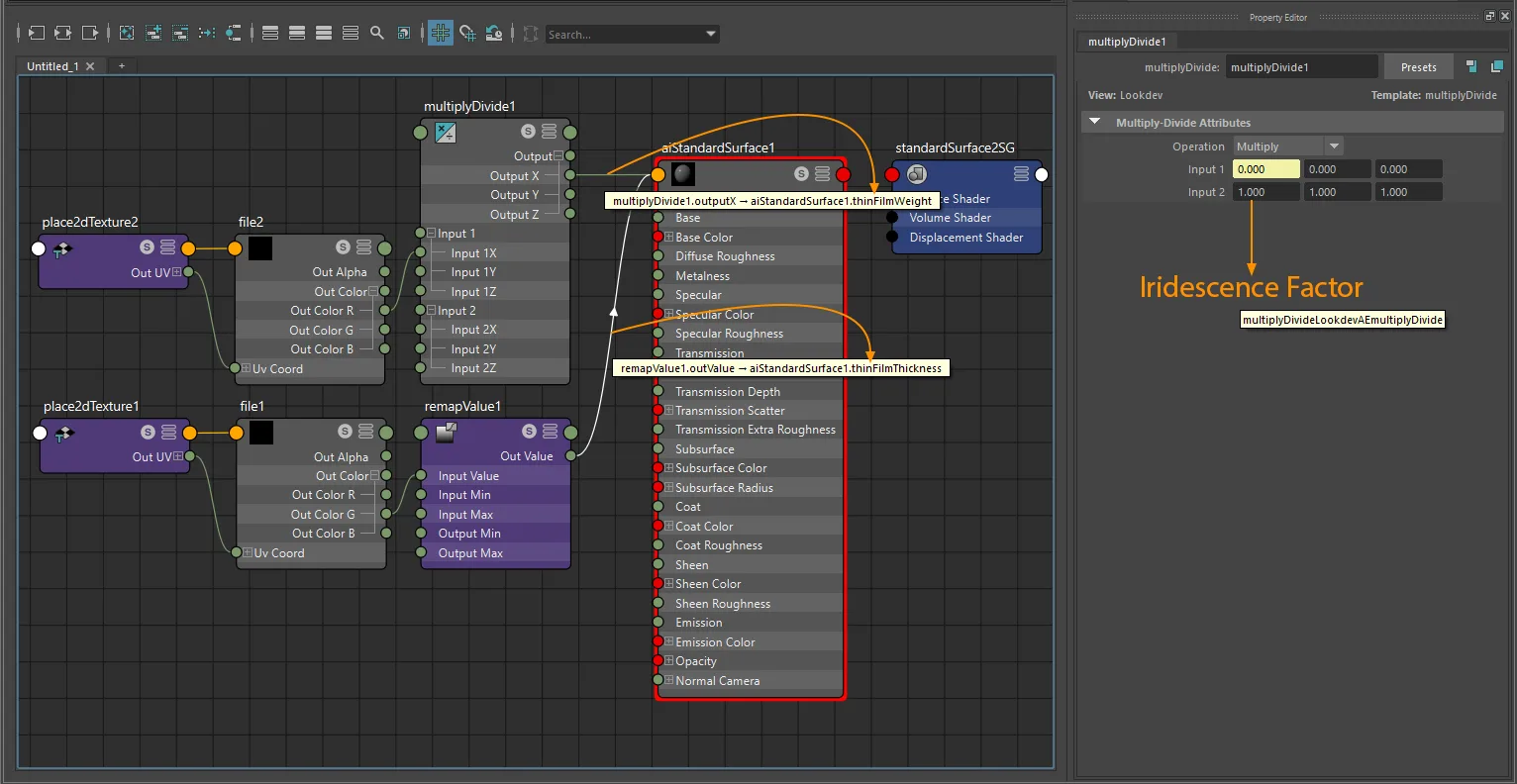
aiStandardSurface factor-plus-texture iridescence setup with file and place2dTexture.
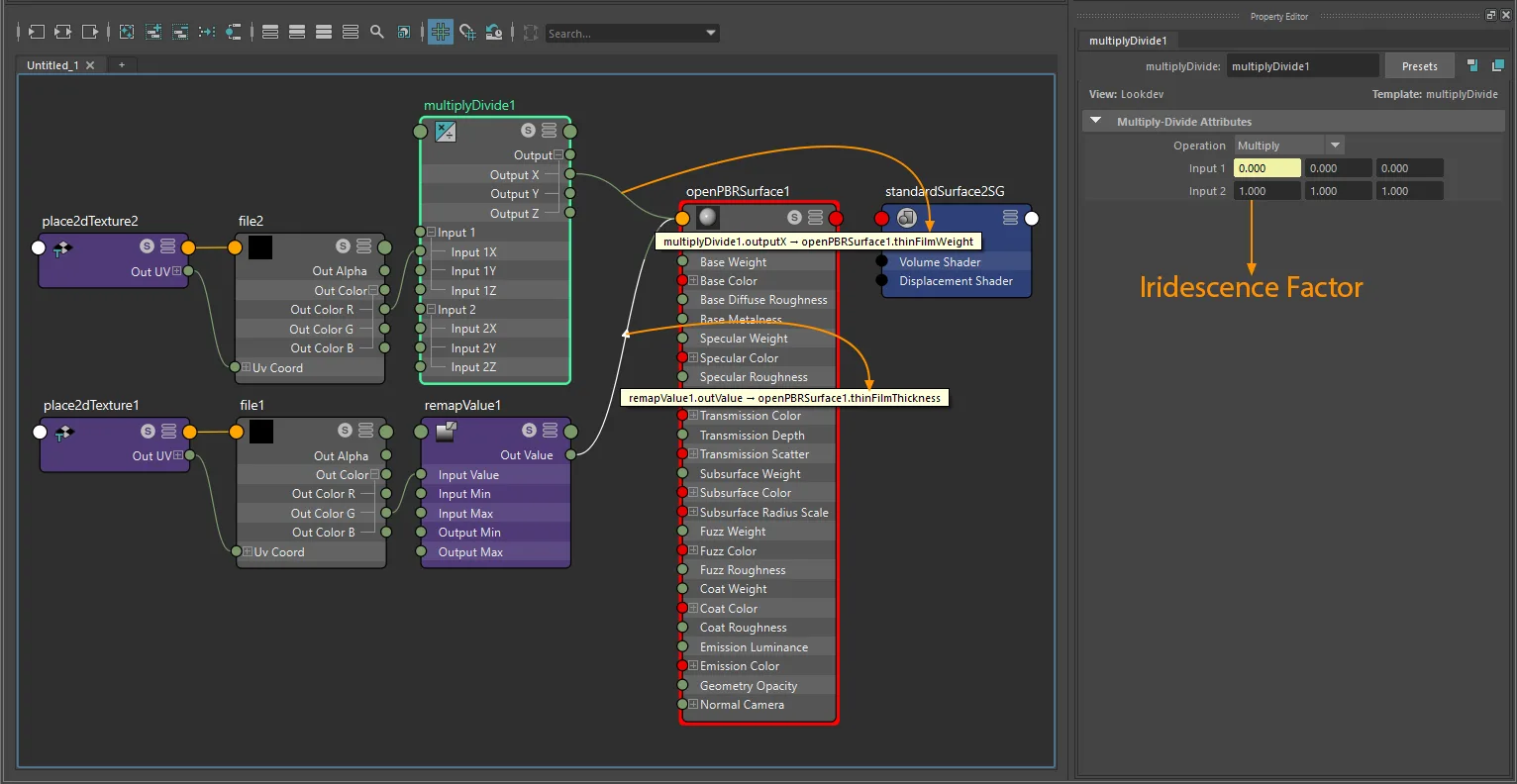
openPBRSurface factor-plus-texture iridescence setup with file and place2dTexture.
Iridescence IOR
Set thinFilmIOR directly on the shader.
Exports as iridescenceIor. Only written when the value differs from the default 1.3 by more than 0.01.
Iridescence thickness
The glTF thickness texture stores normalized 0-1 values that map to a nanometer range defined by iridescenceThicknessMinimum and iridescenceThicknessMaximum. In Maya, the mapping is set up through a remapValue node.
Min / max only
If there is no thickness texture and no remapValue node on the thickness path, glTF falls back to its default range: iridescenceThicknessMinimum = 100 nm and iridescenceThicknessMaximum = 400 nm.
Set thinFilmThickness directly on the shader to export a constant thickness. In that direct scalar case, the exporter writes a constant range with both minimum and maximum set to the same value.
Set this on the shader node itself in the Attribute Editor:
standardSurface,aiStandardSurface,openPBRSurface: Thin Film Thickness
Exports as iridescenceThicknessMinimum and iridescenceThicknessMaximum.
Custom min / max without a thickness texture
If you want different iridescenceThicknessMinimum and iridescenceThicknessMaximum values without using a thickness map, connect a remapValue node directly to shader.thinFilmThickness and set the range on that node.
standardSurface · aiStandardSurface · openPBRSurface:
  remapValue.outValue  ->  shader.thinFilmThickness
Set the range on the remapValue node:
remapValue.outputMin->iridescenceThicknessMinimum(nm)remapValue.outputMax->iridescenceThicknessMaximum(nm)
You do not need to connect a texture for this authoring path. No iridescenceThicknessTexture is exported; the remapValue node is only used to author the min/max range.
Thickness texture with min / max range
Color space: Raw
Connect a texture through a remapValue node:
standardSurface · aiStandardSurface · openPBRSurface:
  aiImage.outColorG  ->  remapValue.inputValue
  remapValue.outValue  ->  shader.thinFilmThickness
For a dedicated grayscale thickness map, outColor, outColorR, outColorG, or outColorB all export equivalently. Thickness tracing always goes through the remapValue node; multiplyDivide is not used for iridescenceThicknessTexture.
Set the nanometer range in the remapValue node:
remapValue.outputMin->iridescenceThicknessMinimum(nm)remapValue.outputMax->iridescenceThicknessMaximum(nm)
In Maya, select the remapValue node in Hypershade or the Node Editor, then set Output Min and Output Max in that node's Attribute Editor. Those two fields are the exported thickness range.
Common point of confusion: whenever a remapValue node is connected to thinFilmThickness, the exporter reads the range from the remapValue node, not from the shader's thinFilmThickness value.
The texture exports as iridescenceThicknessTexture (G channel).
Note
Keep the texture wired through remapValue.inputValue -> remapValue.outValue. The exporter reads outputMin and outputMax; multiplyDivide on the thickness path is not used for iridescence thickness export.
openPBR thickness units
openPBRSurface stores thinFilmThickness in micrometers. The exporter automatically converts to nanometers (×100) before writing to glTF.
Packed texture (weight + thickness in one image)
Use the same source file for both weight and thickness, connecting the correct channel to each:
standardSurface · aiStandardSurface · openPBRSurface:
  texture.outColorR  ->  shader.thinFilmWeight
  texture.outColorG  ->  remapValue.inputValue  ->  shader.thinFilmThickness
The exporter detects that both attributes share the same file and exports it directly as the combined iridescence texture. One texture node feeding both connections is supported, and multiple texture nodes pointing to the same file path are also supported.
For packed RG iridescence, the source-channel rule is strict even when the multiplyDivide lane is flexible:
- Iridescence weight must come from the source texture's R channel.
- Iridescence thickness must come from the source texture's G channel through
remapValue. - The B channel is ignored for iridescence export.
One shared multiplyDivide node or separate multiplyDivide nodes are both supported for the weight path. Thickness still routes through remapValue, not multiplyDivide.
Exports as iridescenceTexture and iridescenceThicknessTexture pointing to the same image.
Separate textures (auto-combined)
Connect different grayscale images to weight and thickness. The exporter repacks them into a single combined image: weight in R, thickness in G.
standardSurface · aiStandardSurface · openPBRSurface:
  textureA.outColorR  ->  shader.thinFilmWeight
  textureB.outColorG  ->  remapValue.inputValue  ->  shader.thinFilmThickness
For true grayscale source images, outColor, outColorR, outColorG, or outColorB are all accepted for either map. Weight can pass through any one multiplyDivide lane (X, Y, or Z), while thickness always connects through remapValue.
If both grayscale maps are present, the exporter generates a packed RG texture on export. Both source images must share the same dimensions.
If only one grayscale map is present, the exporter keeps the original source image as-is:
- Weight only: exports the original grayscale image directly as
iridescenceTexture. - Thickness only: exports the original grayscale image directly as
iridescenceThicknessTexture.
If the thickness map is present, you still need to set the thickness range on the remapValue node. The texture provides the normalized 0-1 signal; Output Min and Output Max define the real exported thickness range.
UV transform
file nodes: set repeat, wrap, mirror, offset, and rotation on the connected place2dTexture.
aiImage nodes: wrap, scale, and offset export natively; rotation requires a place2dTexture.
UV set: assign via Maya's UV Set Editor or UV Linking - see UV Set Selection for node-type differences.
When weight and thickness use a combined texture, the UV transform is read from the weight texture node.
Notes
- All iridescence textures are non-color. Always use
Rawcolor space. - If you leave thickness un-authored, glTF defaults apply: minimum
100nm, maximum400nm. - Iridescence weight and thickness share one glTF texture (R = weight, G = thickness). Use the packed workflow or separate grayscale files - the exporter combines them automatically.
- For grayscale sources, the exporter is permissive about which RGB output channel is used. For packed iridescence, the source channel meaning is strict: R = weight, G = thickness, B = unused.
iridescenceTexturetraces throughmultiplyDividewhen present.iridescenceThicknessTexturetraces throughremapValue; those paths are not interchangeable.- Direct
thinFilmThicknessexport is treated as a constant thickness range (min = max = value). UseremapValue.outputMinandremapValue.outputMaxwhen you need different min and max values. iridescenceIoris only written when the value differs from the default1.3.iridescenceFactoris only written when the value is greater than0.0.- Thickness texture values (
0-1) map to the nanometer range set in theremapValuenode. - For
standardSurfaceandaiStandardSurface,thinFilmWeightis a custom attribute added by the plugin (visible in Extra Attributes). It is removed when the plugin is unloaded.thinFilmThicknessandthinFilmIORare native Arnold attributes. - For
openPBRSurface, all three iridescence attributes (thinFilmWeight,thinFilmThickness,thinFilmIOR) are native shader attributes. StingrayPBSdoes not exportKHR_materials_iridescence.