Dispersion
glTF extension: KHR_materials_dispersion
glTF property: dispersion
Dispersion models chromatic aberration inside transmissive materials - the splitting of white light into its spectral components (e.g., prismatic glass, diamonds). It is a scalar constant; no texture input exists. Requires KHR_materials_dispersion to be enabled in the export options.
Note
Dispersion is only meaningful on transmissive materials. Enable KHR_materials_transmission alongside this extension.
| Shader | Attribute | Notes |
|---|---|---|
standardSurface, aiStandardSurface |
transmissionDispersion |
Unitless dispersion amount |
openPBRSurface |
transmissionDispersionAbbeNumber |
Abbe number (different attribute name) |
StingrayPBS |
not supported | - |
Setting dispersion
standardSurface, aiStandardSurface: Set transmissionDispersion on the shader.
openPBRSurface: Set transmissionDispersionAbbeNumber on the shader. To make dispersion visible in Maya's openPBR shading, also set transmissionDispersionScale to 1.0.
Both export as dispersion. Only written when the value is greater than 0.0 (the default 0.0 means no dispersion).
Note
For openPBRSurface, transmissionDispersionScale = 1.0 is a Maya-side display requirement. The exporter writes only transmissionDispersionAbbeNumber to glTF dispersion; transmissionDispersionScale is not exported.
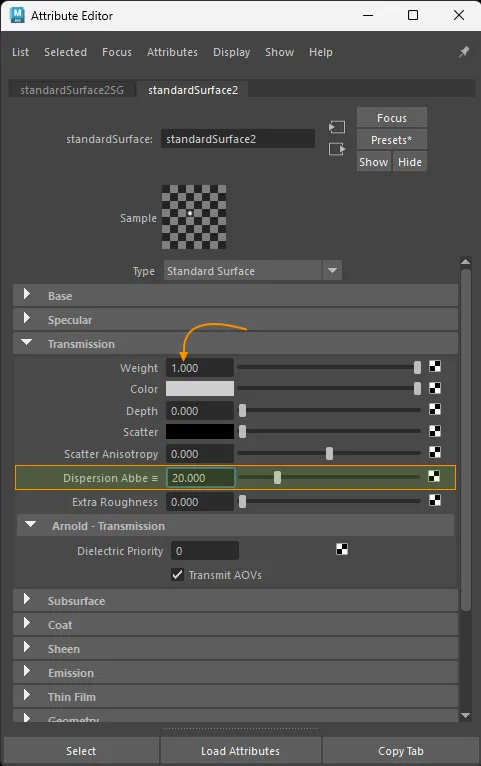
standardSurface dispersion setup.
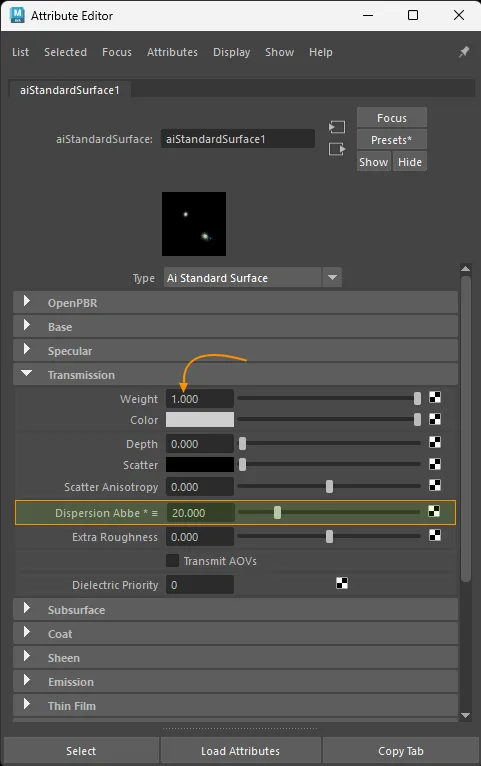
aiStandardSurface dispersion setup.
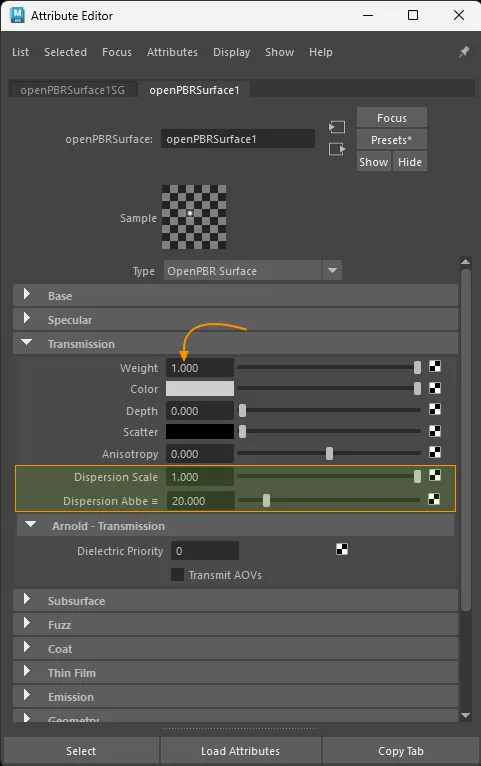
openPBRSurface dispersion setup.
Notes
- Dispersion is scalar only - there is no texture slot.
- Only written when the value is greater than
0.0. standardSurface/aiStandardSurfaceusetransmissionDispersion;openPBRSurfaceusestransmissionDispersionAbbeNumber. Both map directly to the glTFdispersionproperty.openPBRSurfacemay also needtransmissionDispersionScale = 1.0for the effect to evaluate in Maya, but that scale value is not exported to glTF.StingrayPBSdoes not exportKHR_materials_dispersion.
Example: diamond material
A diamond has high transmission, strong dispersion, and a thick volume. The setup below uses the recommended attribute values - adjust them to suit your asset.
standardSurface / aiStandardSurface:
| Attribute | Value | Notes |
|---|---|---|
transmission |
1.0 |
Full transmission (must be > 0) |
specularIOR |
2.42 |
Index of refraction for diamond |
transmissionDispersion |
10.0 |
Dispersion amount |
thickness (Extra Attributes) |
0.02 |
Volume thickness in scene units |
gltfDoubleSided (Extra Attributes) |
enabled | Render both sides |
openPBRSurface:
| Attribute | Value | Notes |
|---|---|---|
transmissionWeight |
1.0 |
Full transmission (must be > 0) |
specularIOR |
2.42 |
Index of refraction for diamond |
transmissionDispersionAbbeNumber |
10.0 |
Abbe number |
transmissionDispersionScale |
1.0 |
Needed for dispersion to evaluate in Maya openPBR; not exported |
thickness (Extra Attributes) |
0.02 |
Volume thickness in scene units |
gltfDoubleSided (Extra Attributes) |
enabled | Render both sides |
Note
thickness and gltfDoubleSided are custom attributes managed by the plugin. They appear in the Extra Attributes section of the Attribute Editor and are auto-created on the first export.