Ambient Occlusion
glTF: occlusionTexture · occlusionTexture.strength
Ambient occlusion (AO) attenuates indirect lighting in crevices. In glTF it is stored in the red channel of occlusionTexture. The strength value scales the effect from 0 (none) to 1 (full).
Note
glTF occlusion is always texture-driven - there is no standalone factor. AO is not read from a native Maya shading slot; it uses a custom gltfAO attribute added by the plug-in, found in the shader's Extra Attributes section.
| Shader | Attribute | Notes |
|---|---|---|
standardSurface, aiStandardSurface, openPBRSurface |
custom gltfAO |
Extra Attributes section |
StingrayPBS |
TEX_ao_map + use_ao_map |
Dedicated Stingray AO path |
Texture only
Color space: Raw
standardSurface · aiStandardSurface · openPBRSurface:
  aiImage.outColorR  ->  shader.gltfAO
  file.outColorR     ->  shader.gltfAO

StingrayPBS:
  grayscale file.outColor   ->  shader.TEX_ao_map  (enable use_ao_map)
  grayscale file.outColorR  ->  shader.TEX_ao_map
  grayscale file.outColorG  ->  shader.TEX_ao_map
  grayscale file.outColorB  ->  shader.TEX_ao_map
Exports as occlusionTexture. glTF reads AO from the red channel.
For a dedicated grayscale AO image, outColor, outColorR, outColorG, or outColorB all export equivalently because the image carries the same value in every RGB channel. For a packed ORM image, connect outColorR so exported occlusion matches the authored red-channel data. If AO is the only channel in use, the exporter keeps the original grayscale image as occlusionTexture instead of generating a packed map.
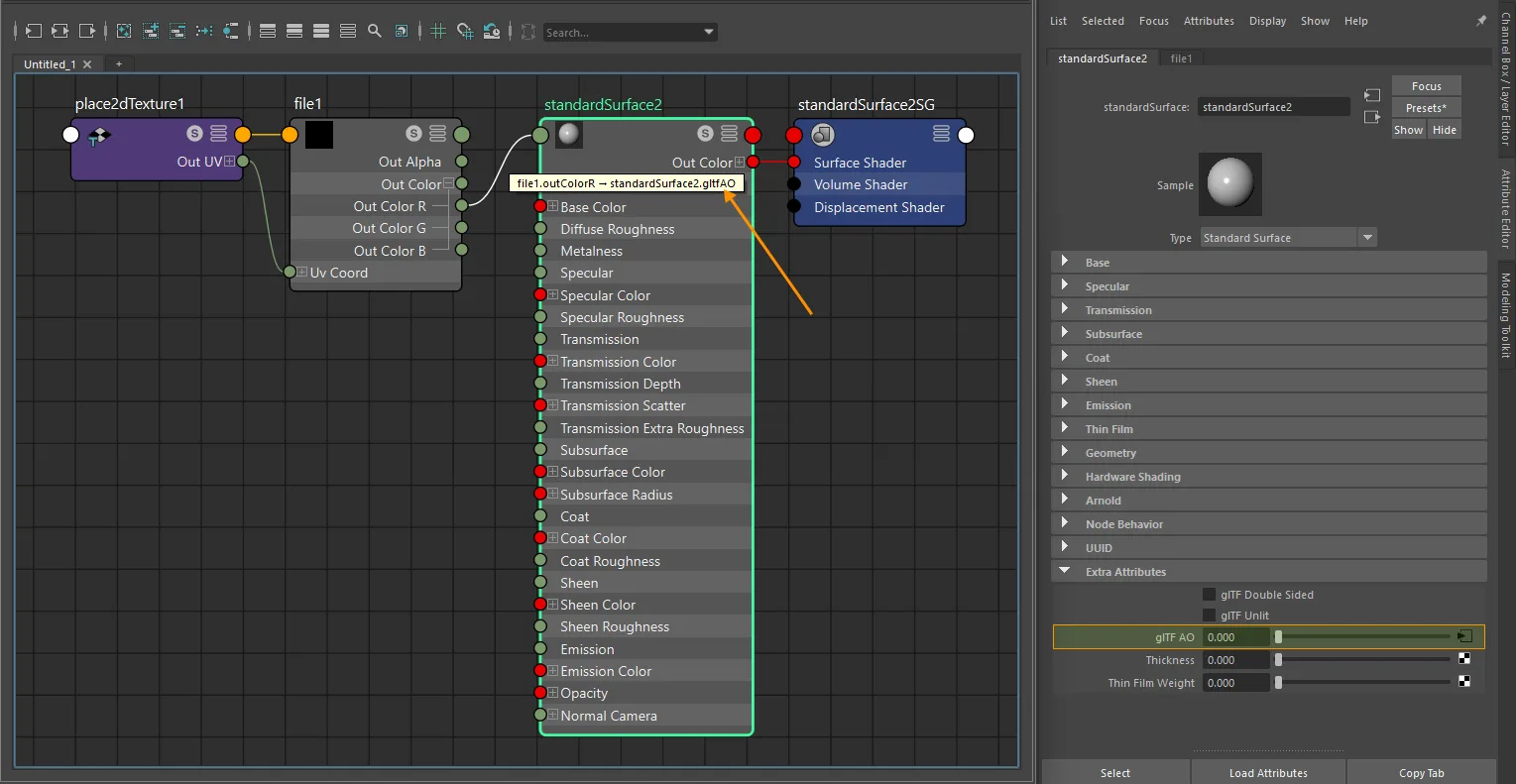
standardSurface texture-only ambient occlusion setup.
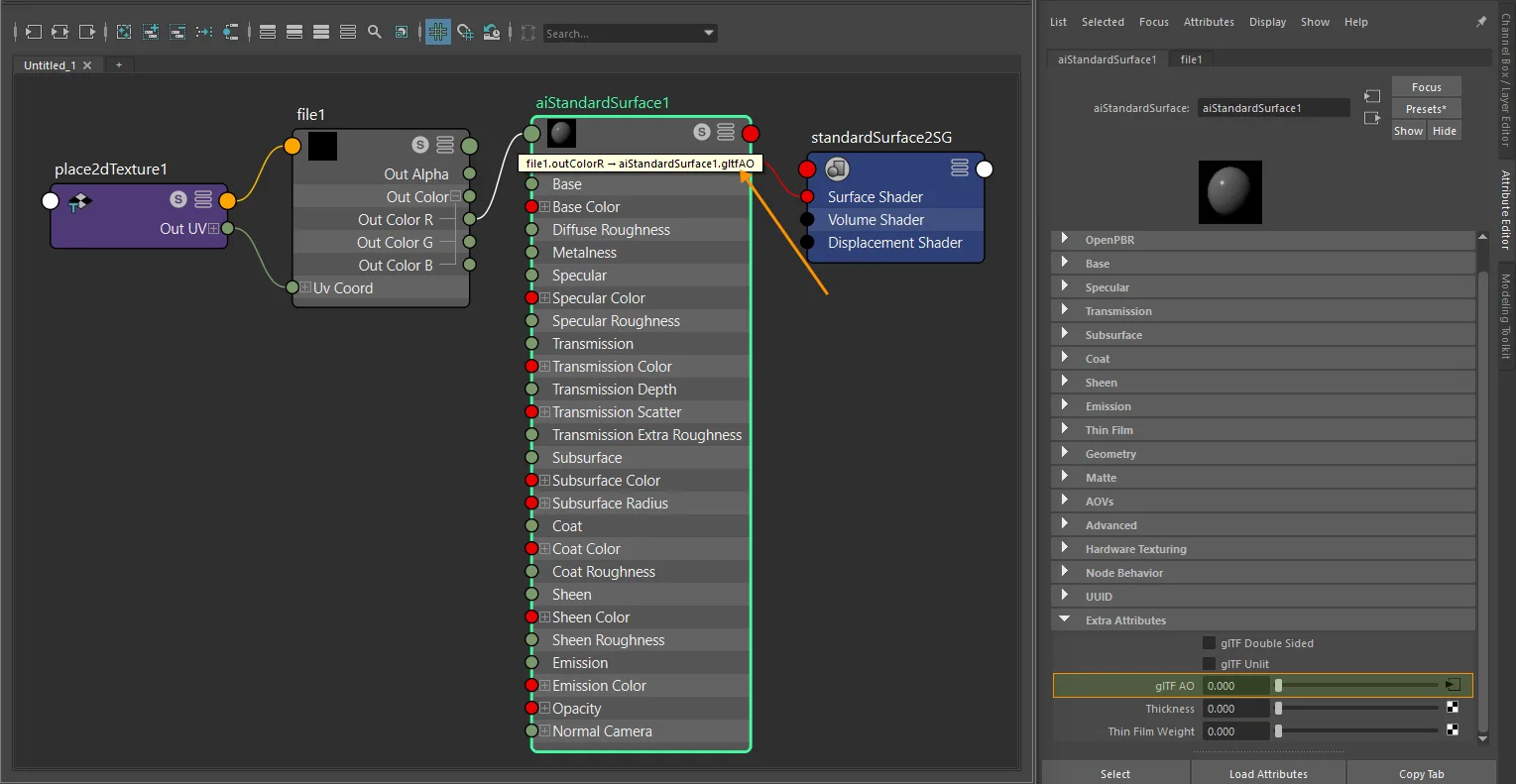
aiStandardSurface texture-only ambient occlusion setup.
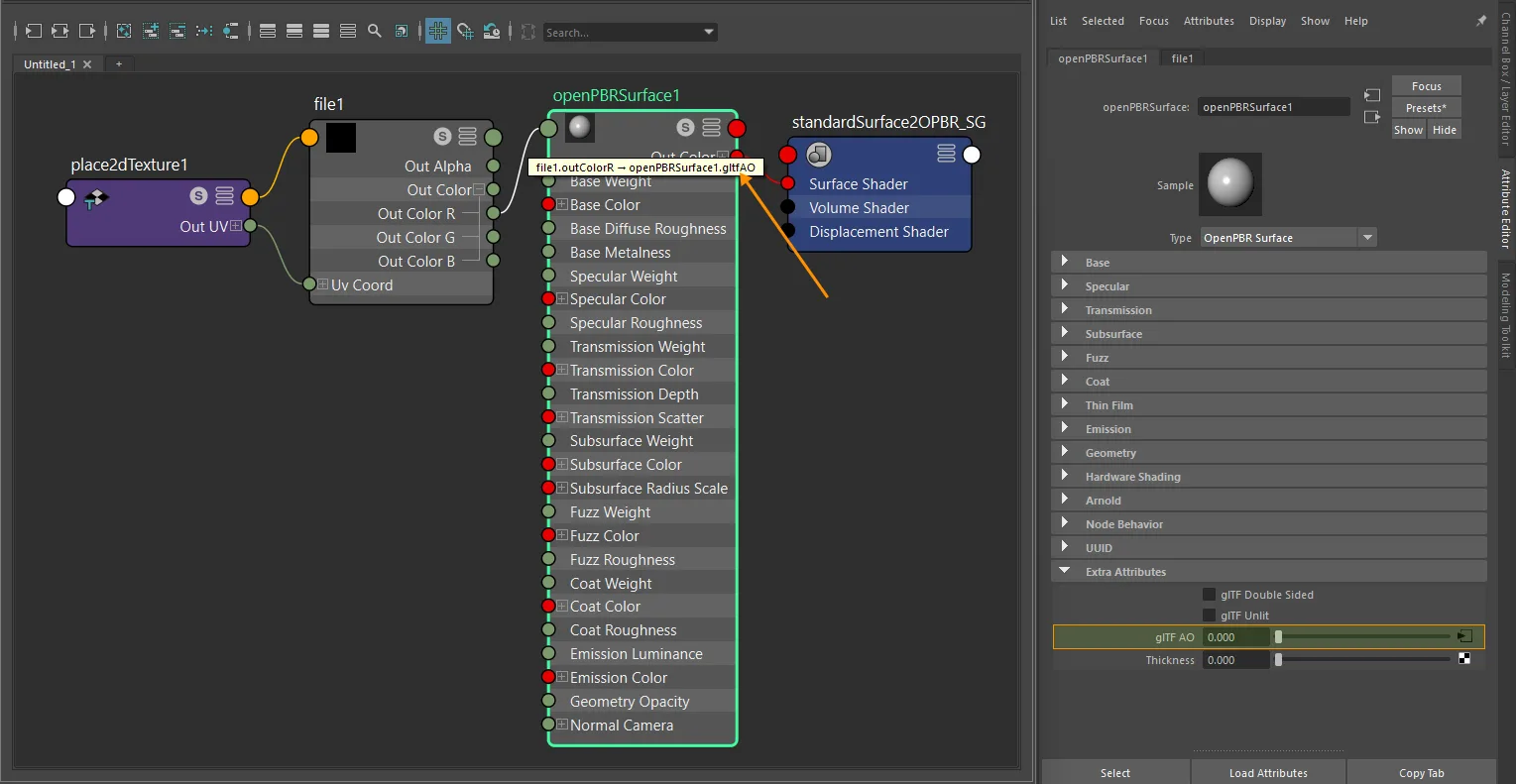
openPBRSurface texture-only ambient occlusion setup.
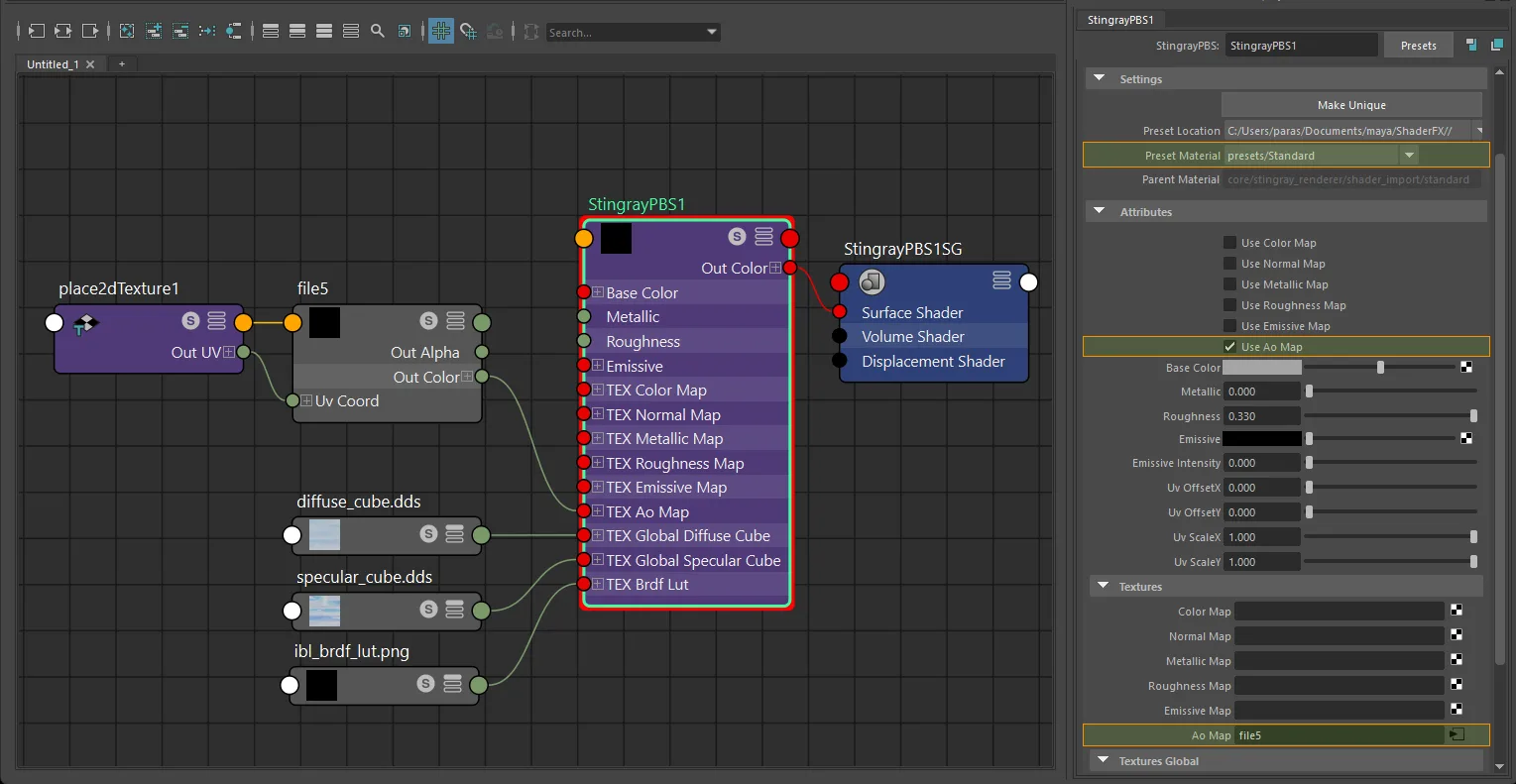
StingrayPBS texture-only ambient occlusion setup.
Texture + strength
Add a multiplyDivide node to export a occlusionTexture.strength value.
For a dedicated grayscale AO image, any one multiplyDivide lane works. The example below uses the X lane because glTF occlusion reads the red channel. For a packed ORM image, keep the source on outColorR; the exporter does not require a specific multiplyDivide lane, but R -> X is the clearest setup.
- Connect the texture
outColorR->multiplyDivide.input1X. - Set the AO strength in
multiplyDivide.input2X. - Connect
multiplyDivide.outputX->shader.gltfAO.
standardSurface · aiStandardSurface · openPBRSurface:
  texture.outColorR  ->  multiplyDivide.input1X  ->  shader.gltfAO
For dedicated grayscale AO maps, outColor, outColorR, outColorG, or outColorB can feed any one matching multiplyDivide lane because the image carries the same value in every RGB channel. For packed ORM images, AO must still originate from the source texture's R channel.
The multiplier exports as occlusionTexture.strength.
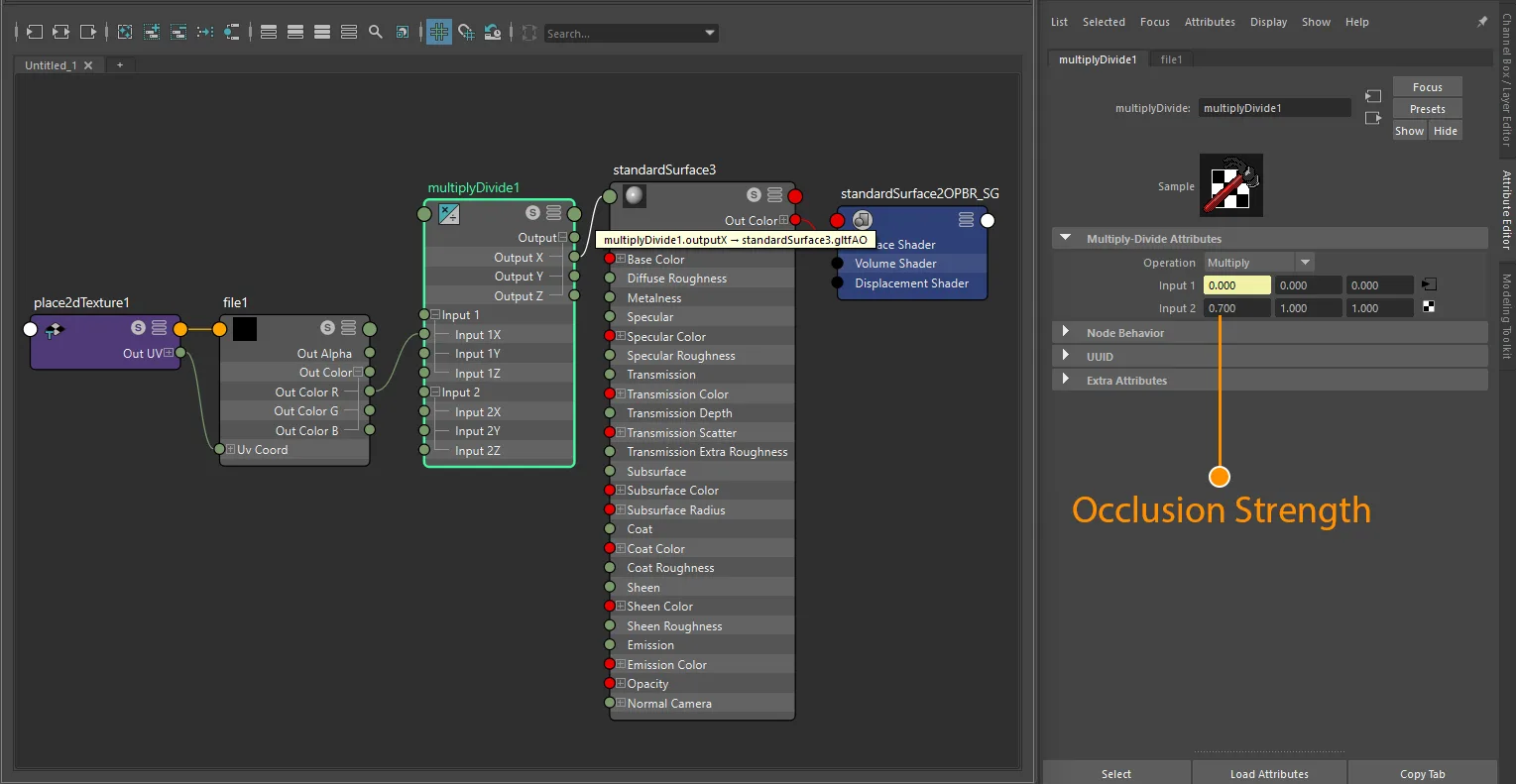
standardSurface ambient occlusion strength-plus-texture setup.
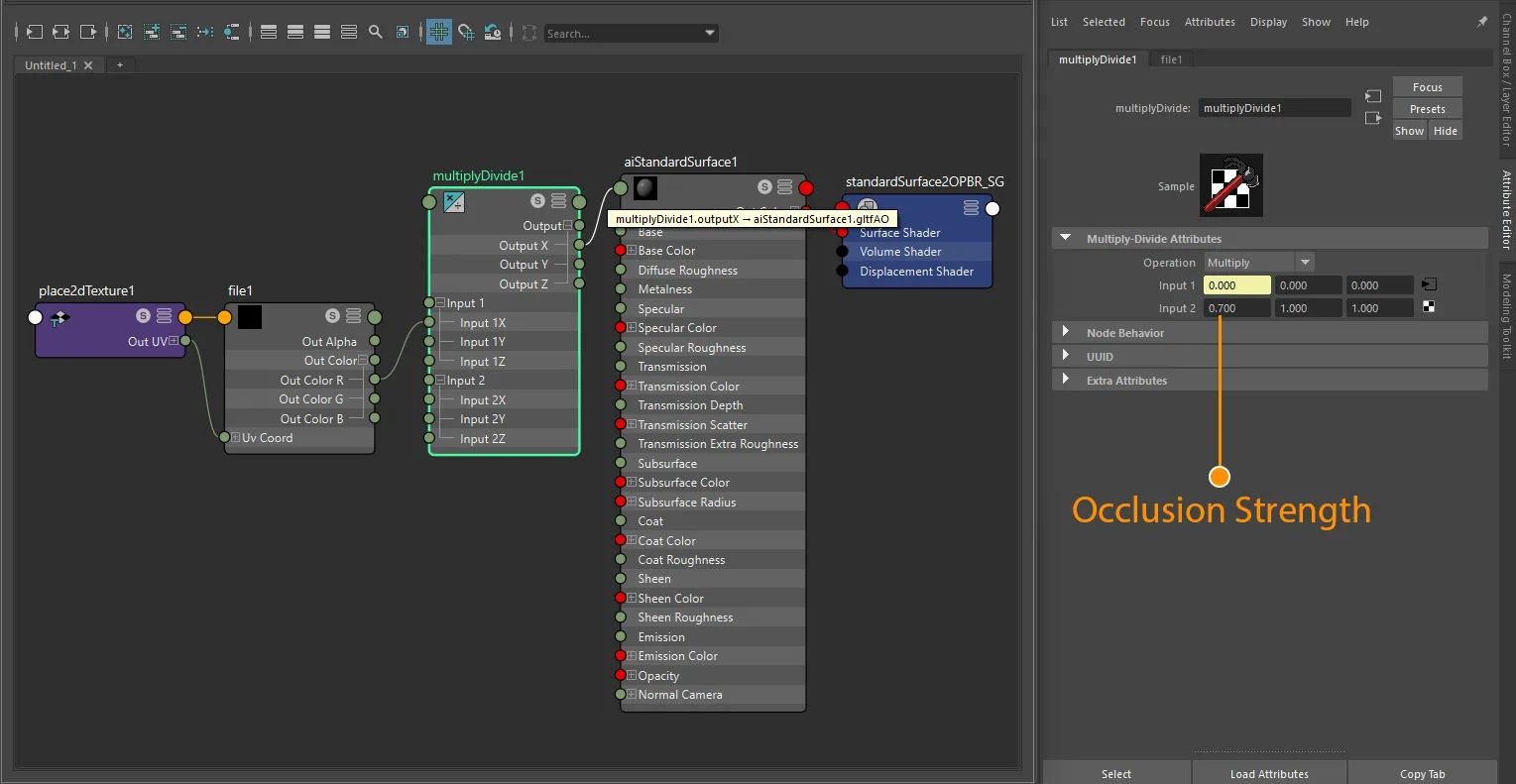
aiStandardSurface ambient occlusion strength-plus-texture setup.
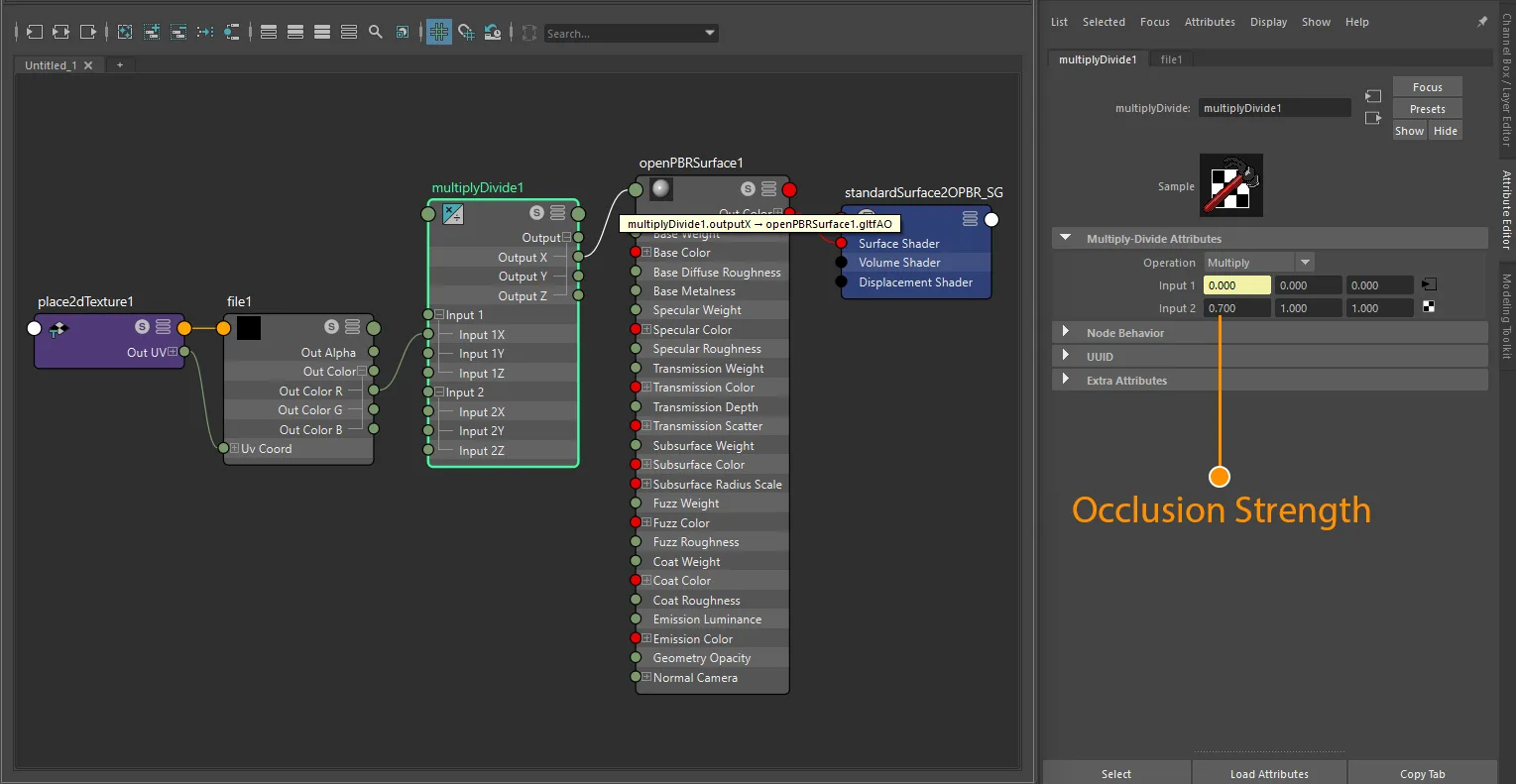
openPBRSurface ambient occlusion strength-plus-texture setup.
Note
StingrayPBS does not export an AO strength value.
Packed ORM map
The preferred glTF layout when AO, roughness, and metallic share one texture:
| Channel | Data |
|---|---|
| R | Occlusion |
| G | Roughness |
| B | Metallic |
texture.outColorR  ->  shader.gltfAO
texture.outColorG  ->  shader.specularRoughness
texture.outColorB  ->  shader.metalness        (standardSurface · aiStandardSurface)
texture.outColorB  ->  shader.baseMetalness    (openPBRSurface)
For standardSurface, aiStandardSurface, and openPBRSurface, AO is exported from a packed ORM image only when that image's R channel is explicitly connected to gltfAO. One shared texture node or multiple texture nodes that point to the same file are both supported. Without the gltfAO connection, the exporter writes only metallicRoughnessTexture and omits occlusionTexture.
The same rule applies when a multiplyDivide node is present: one shared multiplyDivide node or separate multiplyDivide nodes are both supported, and the AO signal may pass through any X, Y, or Z lane. What matters for packed ORM export is that the source texture channel connected to gltfAO is R.
For StingrayPBS, all of these packed workflows are supported:
- one shared
filenode feedingTEX_ao_map,TEX_roughness_map, andTEX_metallic_map - one shared
filenode feeding only roughness and metallic, with AO omitted - separate
filenodes that point to the same ORM image for AO, roughness, and metallic - shared-image
outColorconnections where the exporter infers AO = R, Roughness = G, Metallic = B from the destination attributes
Separate grayscale maps are also supported - the exporter can repack them into a full ORM texture. All maps must share the same dimensions. If only AO is present, it is exported directly as occlusionTexture without repacking.
If AO, roughness, and metallic are separate grayscale files, the exporter generates a packed OR, OM, MR, or ORM texture whenever 2 or 3 of those channels are texture-driven. If metallic and roughness already share one packed source image but AO comes from a different file, the exporter keeps AO as a separate occlusionTexture instead of merging it into that MR image.
UV transform
file nodes: set repeat, wrap, mirror, offset, and rotation on the connected place2dTexture.
aiImage nodes: wrap, scale, and offset export natively; rotation requires a place2dTexture.
UV set: assign via Maya's UV Set Editor or UV Linking - see UV Set Selection for node-type differences.
For standardSurface, aiStandardSurface, and openPBRSurface, keep AO, roughness, and metallic inputs on matching UV sets and matching transforms when you expect them to share one exported texture. When the exporter reuses or generates a packed OR/MR/OM/ORM texture, it takes the UV transform and texCoord from the first resolved metallic, roughness, or AO texture node.
If StingrayPBS AO uses a different UV set or place2dTexture transform from metallic/roughness, the exporter warns and keeps AO as a separate occlusionTexture instead of packing it into the ORM image.
Notes
- AO is a non-color map. Always use
Rawcolor space. - Use grayscale AO maps for standalone inputs. If AO lives in the red channel of a packed image, follow the packed ORM workflow above.
- Add
gltfAOfrom the shader's Extra Attributes section - it is not present by default. - If packing into a single image, AO must be in the red channel per the glTF spec.
StingrayPBS: standalone grayscale AO acceptsoutColor,outColorR,outColorG, oroutColorB. Packed ORM detection prefers shared-image workflows and maps AO to glTF R on export.