Clearcoat
glTF extension: KHR_materials_clearcoat
glTF properties: clearcoatFactor · clearcoatTexture · clearcoatRoughnessFactor · clearcoatRoughnessTexture · clearcoatNormalTexture
Clearcoat simulates a thin, glossy, transparent layer on top of the base material (e.g., car paint, lacquered wood). Requires KHR_materials_clearcoat to be enabled in the export options.
| Shader | Clearcoat intensity | Clearcoat roughness | Clearcoat normal | Notes |
|---|---|---|---|---|
standardSurface, aiStandardSurface |
coat |
coatRoughness |
coatNormal |
|
openPBRSurface |
coatWeight |
coatRoughness |
geometryCoatNormal |
Different intensity attribute name |
StingrayPBS |
not supported | not supported | not supported | - |
In glTF, clearcoat intensity and clearcoat roughness share one texture image:
| Channel | Data |
|---|---|
| R | Clearcoat intensity |
| G | Clearcoat roughness |
The clearcoat normal is always a separate texture.
Clearcoat intensity
Factor only
Set the clearcoat attribute directly on the shader. The exporter only writes clearcoat data when the value is greater than 0.0.
standardSurface,aiStandardSurface: setcoat.openPBRSurface: setcoatWeight.
Exports as clearcoatFactor.
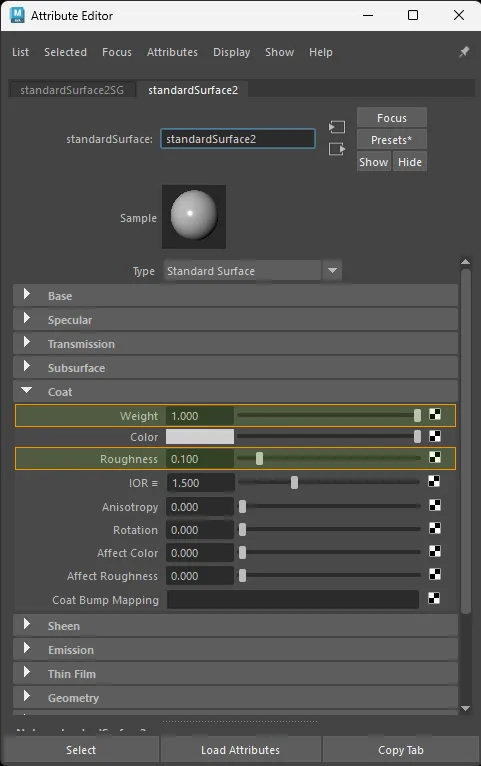
standardSurface factor-only clearcoat setup.
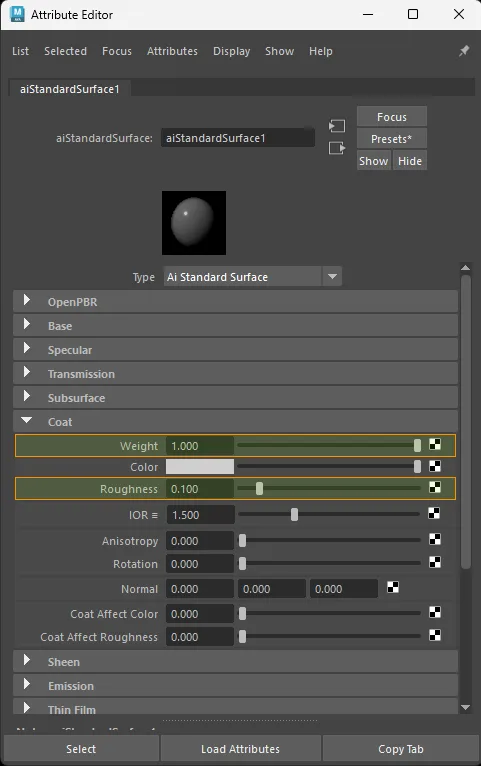
aiStandardSurface factor-only clearcoat setup.
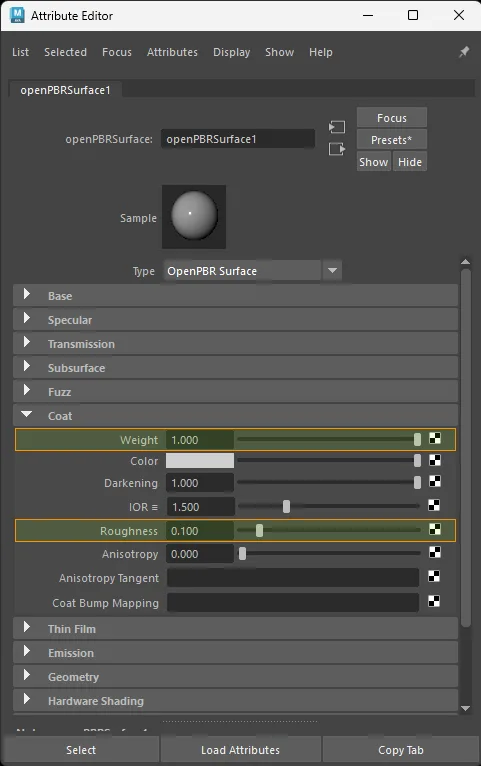
openPBRSurface factor-only clearcoat setup.
Texture only
Color space: Raw
standardSurface · aiStandardSurface:
  aiImage.outColorR  ->  shader.coat
  file.outColorR     ->  shader.coat

openPBRSurface:
  aiImage.outColorR  ->  shader.coatWeight
  file.outColorR     ->  shader.coatWeight
Exports as clearcoatTexture (R channel of the combined clearcoat image).
For a dedicated grayscale clearcoat image, outColor, outColorR, outColorG, or outColorB all export equivalently because the image carries the same value in every RGB channel. The examples above use outColorR to mirror glTF's clearcoat channel.
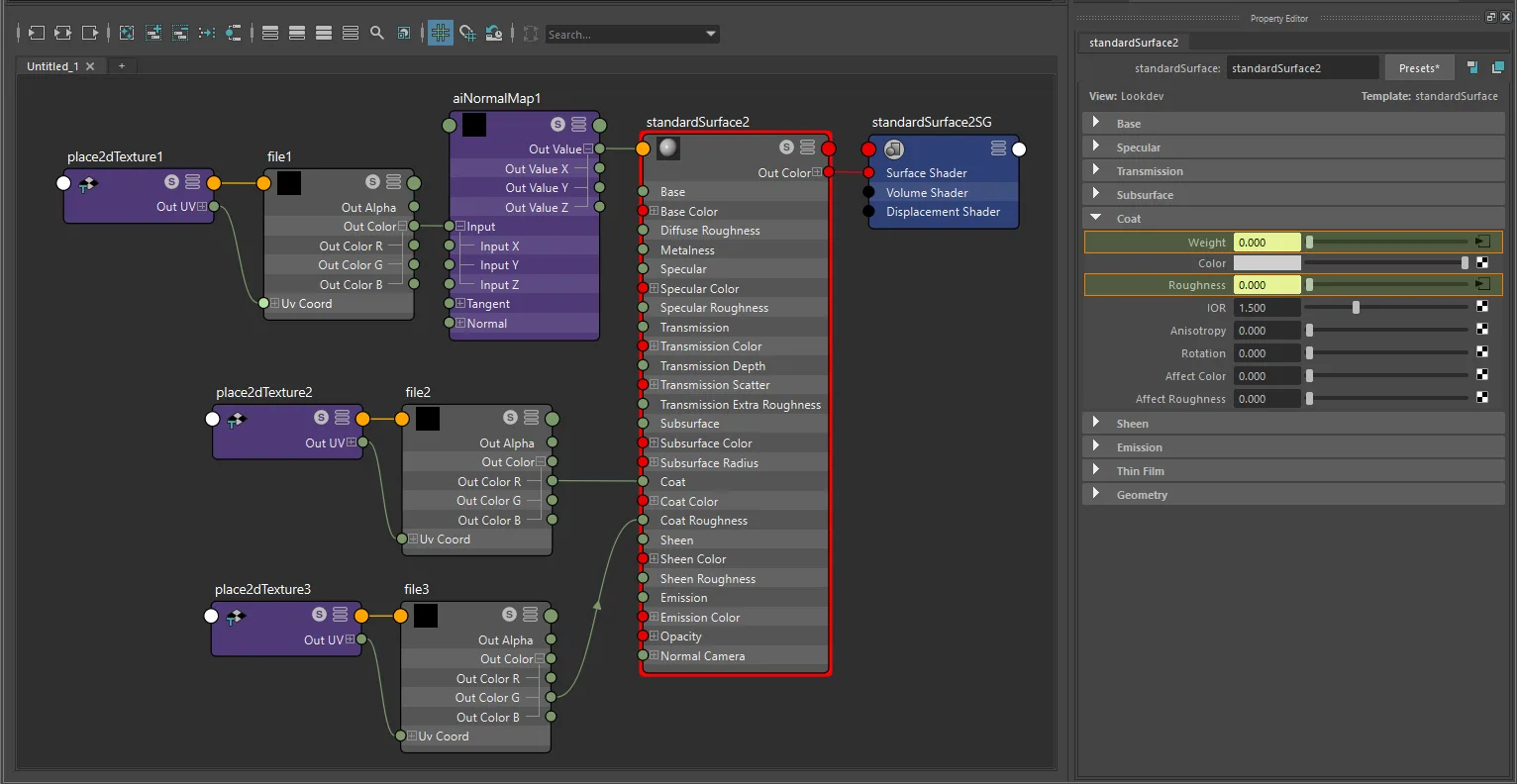
standardSurface texture-only clearcoat setup with file and place2dTexture.
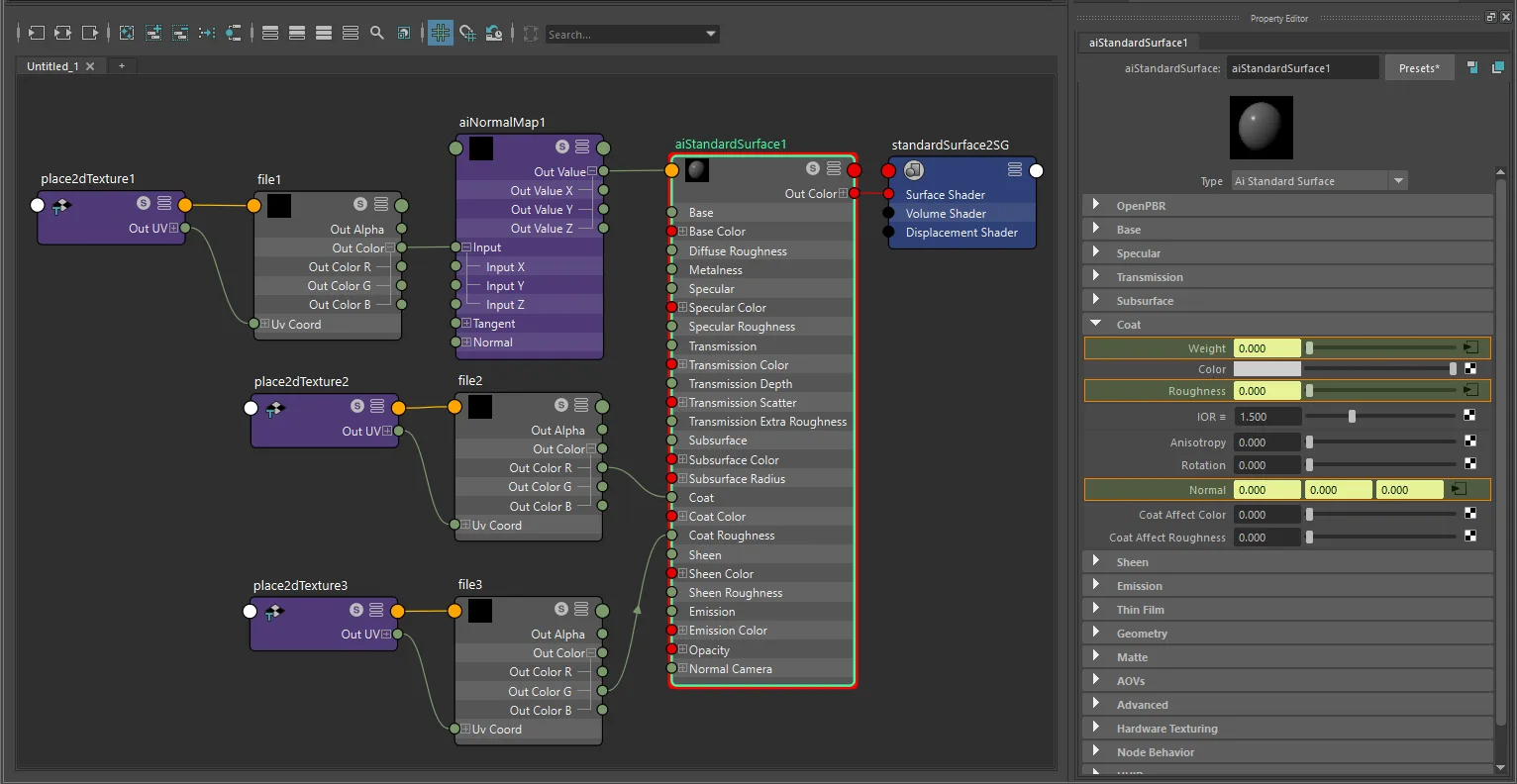
aiStandardSurface texture-only clearcoat setup with file and place2dTexture.
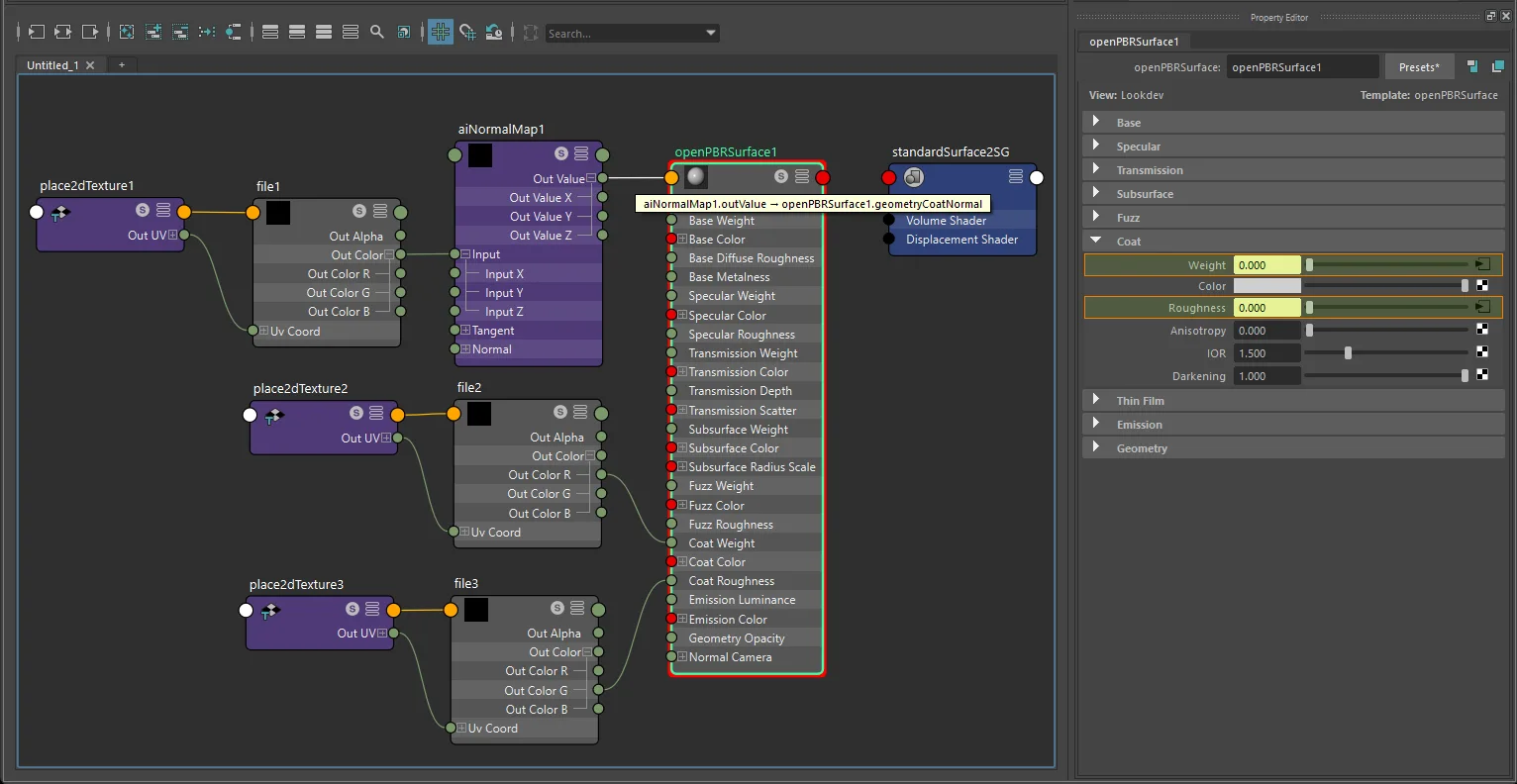
openPBRSurface texture-only clearcoat setup with file and place2dTexture.
Factor + texture
glTF computes: clearcoatFactor × clearcoatTexture.R
For a dedicated grayscale clearcoat map, any one multiplyDivide lane can be used:
- Connect the grayscale clearcoat texture into one lane of
multiplyDivide.input1X,input1Y, orinput1Z. - Set the matching clearcoat multiplier on
multiplyDivide.input2X,input2Y, orinput2Z. - Connect the matching
multiplyDivide.outputX,outputY, oroutputZ->shader.coat(orcoatWeight).
For true grayscale sources, outColor, outColorR, outColorG, or outColorB can feed that lane. The exporter follows the real upstream source plug, so lane choice does not need to be X unless you are intentionally mirroring glTF's packed clearcoat channel layout.
The multiplier exports as clearcoatFactor.
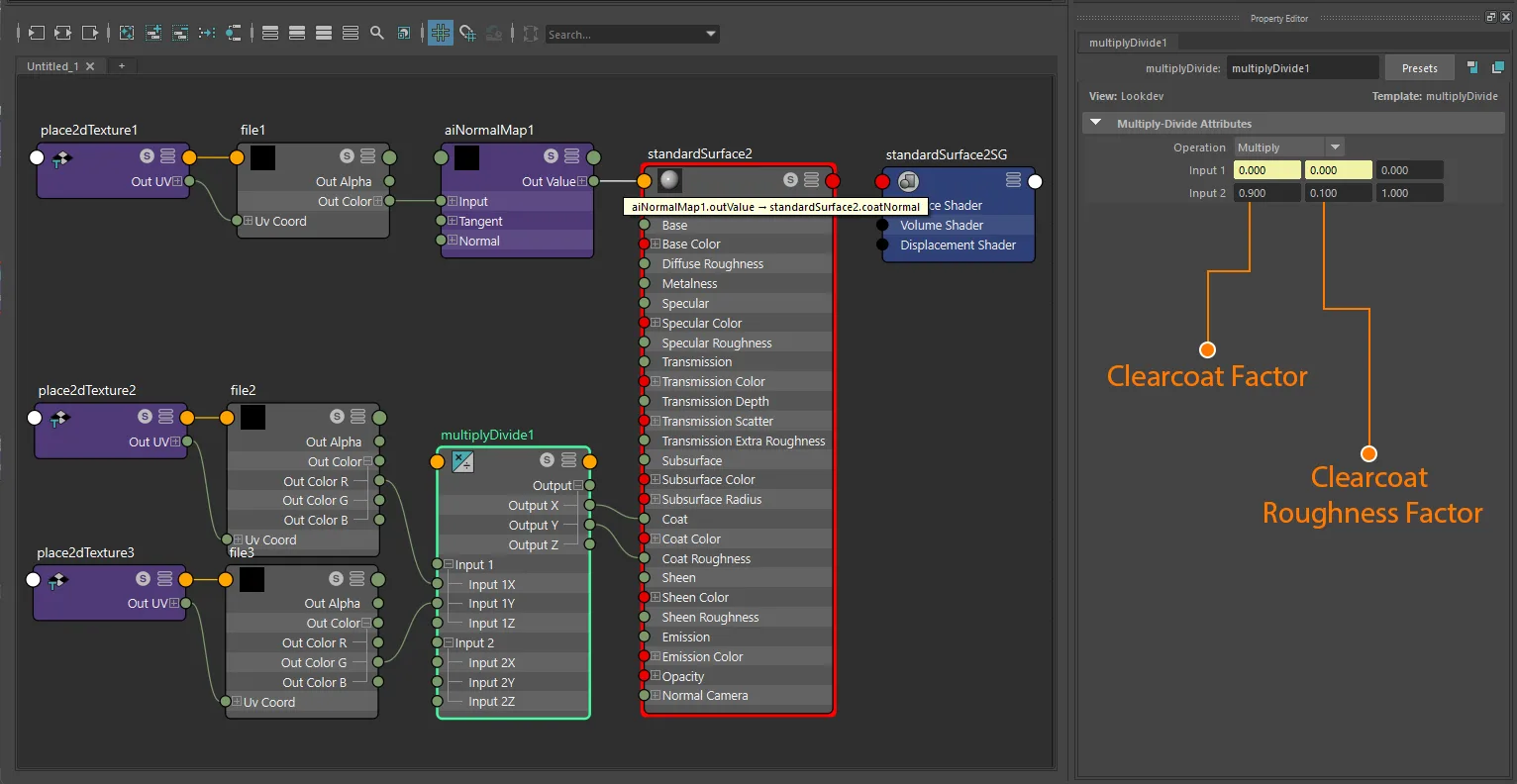
standardSurface factor-plus-texture clearcoat setup with file and place2dTexture.
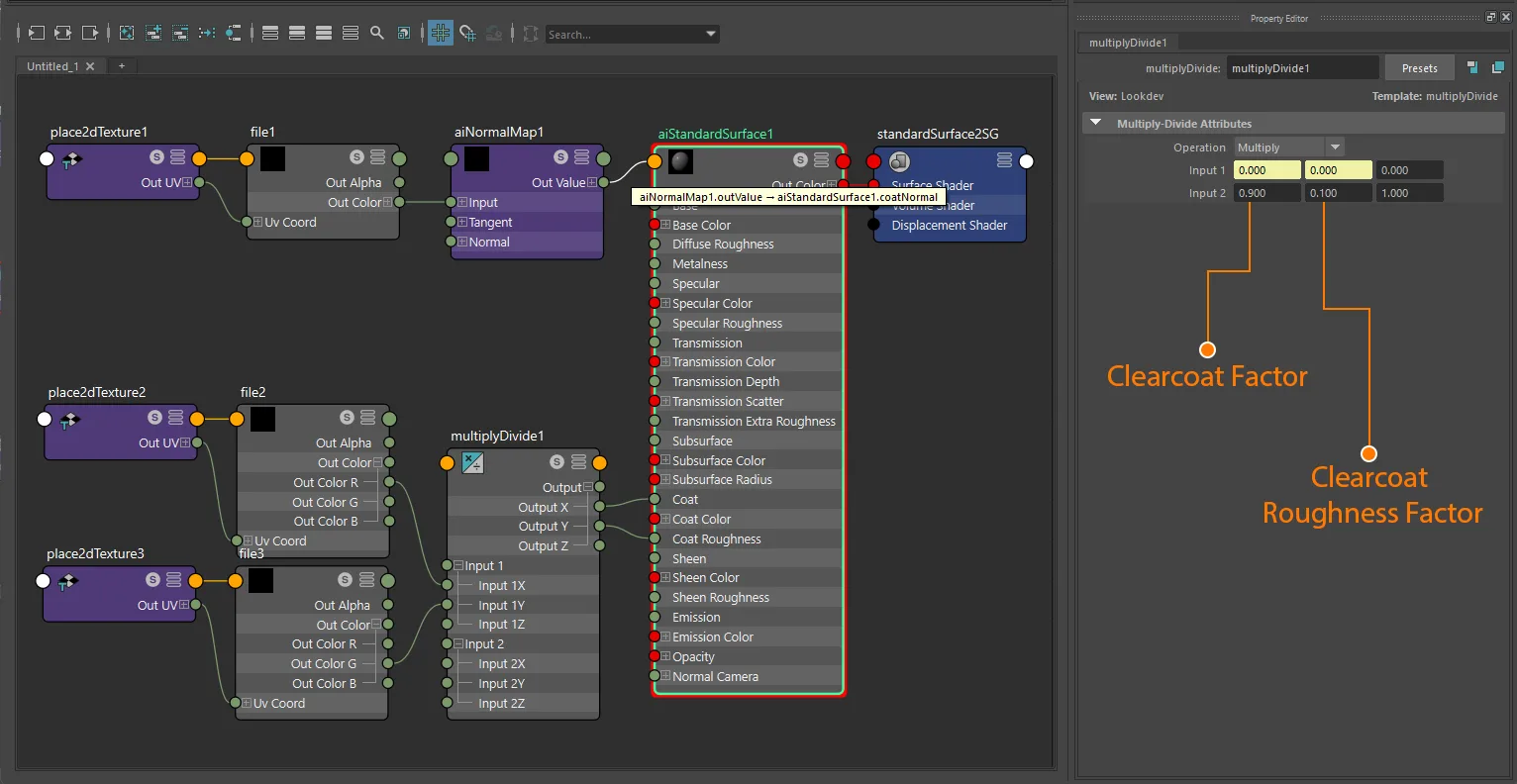
aiStandardSurface factor-plus-texture clearcoat setup with file and place2dTexture.
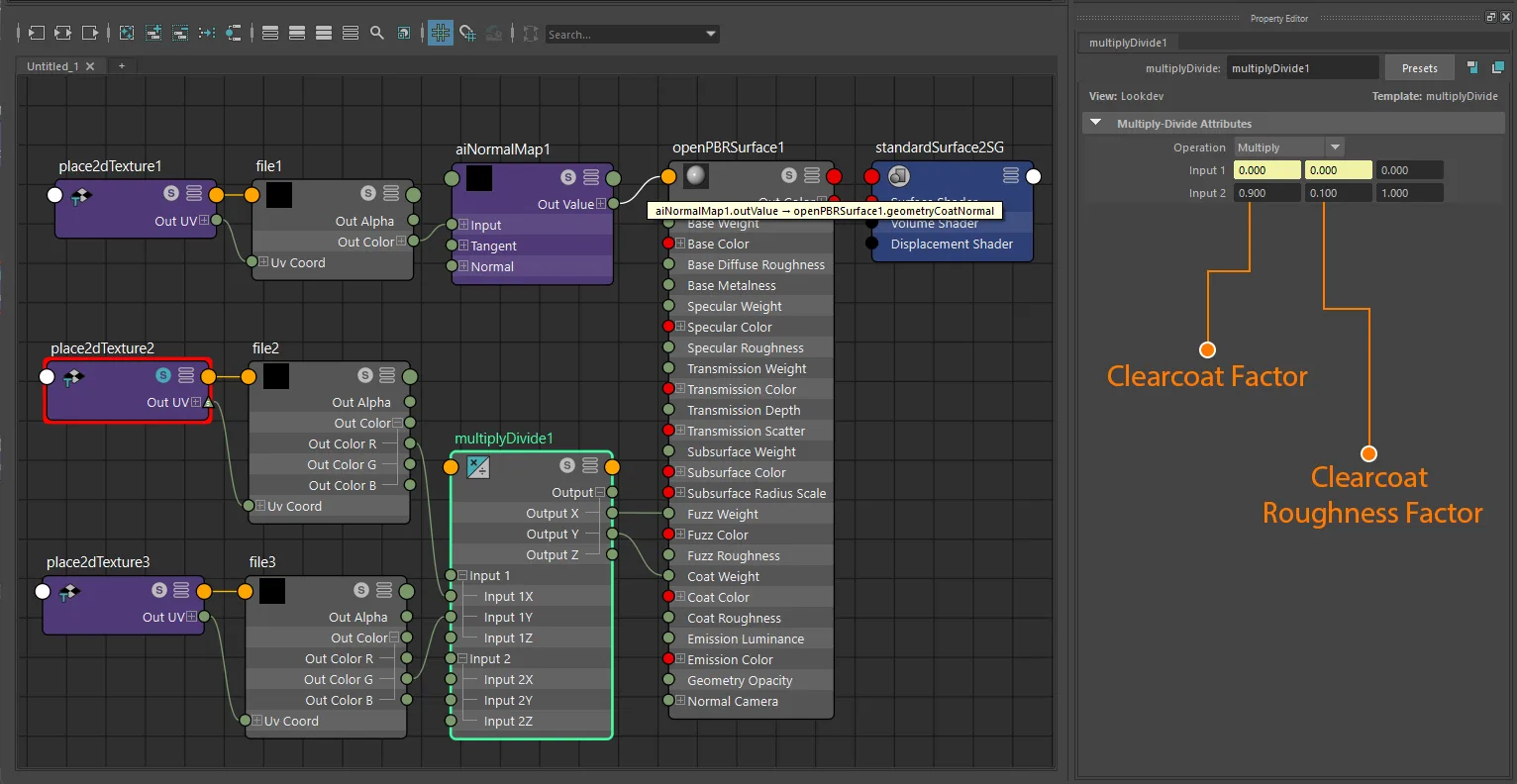
openPBRSurface factor-plus-texture clearcoat setup with file and place2dTexture.
Clearcoat roughness
Clearcoat roughness always uses the same texture image as clearcoat intensity, with roughness stored in the green channel. The two can share the same source file (packed) or come from separate grayscale files that the exporter combines automatically.
Factor only
Set coatRoughness directly on the shader. Roughness is only written when clearcoat is also active (factor > 0 or texture present).
Exports as clearcoatRoughnessFactor.
Packed texture (same image as clearcoat intensity)
Use the same source file for both attributes, connecting the appropriate channel to each.
Color space: Raw
standardSurface · aiStandardSurface · openPBRSurface:
  texture.outColorR  ->  shader.coat        (or coatWeight)
  texture.outColorG  ->  shader.coatRoughness
The exporter detects that both attributes share the same file and exports it directly as the combined clearcoat texture. One texture node feeding both channels is supported, and multiple texture nodes pointing to the same file path are also supported. One shared multiplyDivide node or separate multiplyDivide nodes are both supported.
For packed clearcoat, the source-channel rule is strict even when the multiplyDivide lane is flexible:
- Clearcoat intensity must come from the source texture's R channel.
- Clearcoat roughness must come from the source texture's G channel.
- The B channel is ignored for clearcoat export.
Exports as clearcoatTexture and clearcoatRoughnessTexture pointing to the same image.
Separate textures (auto-combined)
Connect different grayscale images to each attribute. The exporter repacks them into a single combined image: clearcoat intensity in R, clearcoat roughness in G.
standardSurface · aiStandardSurface · openPBRSurface:
  textureA.outColorR  ->  shader.coat           (or coatWeight)
  textureB.outColorG  ->  shader.coatRoughness
For true grayscale source images, outColor, outColorR, outColorG, or outColorB are all accepted for either attribute, because the exporter follows the real upstream source plug and grayscale data is identical across RGB. Those grayscale signals can pass through any one multiplyDivide lane (X, Y, or Z) on a shared node or on separate nodes.
If both clearcoat intensity and clearcoat roughness use separate grayscale textures, the exporter generates a packed RG clearcoat texture on export. Both source images must share the same dimensions.
If only one grayscale texture is present, the exporter keeps the original source image as-is:
- Clearcoat intensity only: exports the original grayscale image directly as
clearcoatTexture. - Clearcoat roughness only: exports the original grayscale image directly as
clearcoatRoughnessTexture.
Factor + texture
glTF computes: clearcoatRoughnessFactor × clearcoatRoughnessTexture.G
For a dedicated grayscale roughness map, the factor can live on any matching multiplyDivide lane. Use the same pattern as clearcoat intensity: connect the grayscale source to one lane of input1*, set the matching scalar on input2*, and route the corresponding output* to coatRoughness.
If the source is a packed RG clearcoat texture, lane choice is still flexible, but the source texture channel must remain G for roughness.
Clearcoat normal map
The clearcoat normal is always its own separate texture. It works exactly like the base normal map - route the texture through an aiNormalMap node.
Color space: Raw
standardSurface · aiStandardSurface:
  aiImage.outColor  ->  aiNormalMap  ->  shader.coatNormal
  file.outColor     ->  aiNormalMap  ->  shader.coatNormal

openPBRSurface:
  aiImage.outColor  ->  aiNormalMap  ->  shader.geometryCoatNormal
  file.outColor     ->  aiNormalMap  ->  shader.geometryCoatNormal
aiNormalMap.strength exports as clearcoatNormalTexture scale.
Green-channel inversion is handled the same way as the base normal map - if any of invertY, flipY, invert_y, invertGreen, or invertG is enabled on the aiNormalMap node, the exporter generates an inverted-green image.
UV transform
file nodes: set repeat, wrap, mirror, offset, and rotation on the connected place2dTexture.
aiImage nodes: wrap, scale, and offset export natively; rotation requires a place2dTexture.
UV set: assign via Maya's UV Set Editor or UV Linking - see UV Set Selection for node-type differences.
When clearcoat intensity and roughness use a combined texture, the UV transform is read from whichever texture node is found first.
Notes
- All clearcoat data is non-color. Always use
Rawcolor space for every clearcoat texture. - Clearcoat intensity and roughness share one glTF texture (R = intensity, G = roughness). Use the packed workflow or separate grayscale files - the exporter combines them automatically.
- For true grayscale source images, the exporter is permissive about RGB output choice (
outColor,outColorR,outColorG,outColorB) andmultiplyDividelane choice. - For packed clearcoat images, the exporter is strict about source-channel meaning: R = clearcoat intensity, G = clearcoat roughness, B = unused.
- The clearcoat normal is always a separate texture from the combined clearcoat image.
- Clearcoat roughness is only exported when clearcoat intensity is also active (
coat/coatWeight> 0, or a clearcoat texture is present). StingrayPBSdoes not exportKHR_materials_clearcoat.